Adaptive and Turbo Dialing
Last updated: September 22, 2026
This guide explains what Adaptive Dialing and Turbo Dialing are, how they work, and how to use them to place more calls without increasing your number of cancelled calls.
Overview
The Nooks Dialer supports various dialing modes to enable you to work through your dial lists efficiently. The two manual modes are:
Power Dialing: The Dialer calls one prospect at a time and connects you to every call.
Parallel Dialing: The Dialer calls several prospects at once (between 2 and 5 at a time) and only connects you when a real person picks up. Voicemails are skipped automatically, so you're only connected to live answers. Dial trees are navigated automatically when Auto Navigate Dial Trees is turned on (Settings > Dialer, or the switch in your parallel dialing options). When it's off, known dial trees are set aside in a separate Dial trees section instead of being dialed. Gatekeepers are skipped only if you turn on Skip Gatekeepers, which is off by default.
Parallel Dialing increases your call volume by dialing multiple prospects at once. However, using more than one line also increases the chance that Nooks has to cancel calls when a prospect answers. With standard Parallel Dialing, you choose a fixed line count and manage that trade off yourself.
Adaptive Dialing and Turbo Dialing solve this trade-off by letting Nooks automatically adjust your number of active lines, second by second, based on the real-time probability that a given call will be picked up. Because Nooks is actively deciding when to add additional lines, these modes remove a lot of the guesswork (and risk) of picking your own line count. These modes increase your call volume while minimizing the number of cancelled calls.
Availability
You can use Adaptive or Turbo Dialing if:
You have a Parallel Dialing seat.
You are using a standard Nooks phone number (not a Branded phone number).
Your Workspace is opted into Data Sharing. Adaptive and Turbo Dialing rely on Nooks’ pickup-likelihood predictions, which aggregate call quality signals across Workspaces to identify those most likely to pick up.
How Adaptive Dialing Works
With Adaptive Dialing, Nooks uses your selected Parallel-line count (2–5) as a starting point. As you make dials, Nooks intelligently increases or decreases the number of active lines based on live pickup predictions.
Specifically, Nooks continuously evaluates every ringing call to determine whether it is safe to add another line. Each second, Nooks estimates the probability that one of your active calls will connect. If that probability is low, Nooks adds another dialing line; if it is high, Nooks waits until that probability decreases before adding one.
When making this prediction, Nooks considers:
The number's Pickup Likelihood score: Prospects with "hot" numbers are generally more likely to pick up than those with "cold" numbers.
How long the call has been ringing: The probability of a prospect answering changes over the course of the call.
Adaptive Dialing always respects any Parallel Dialing limits set by your Workspace admins.
How Turbo Dialing Works
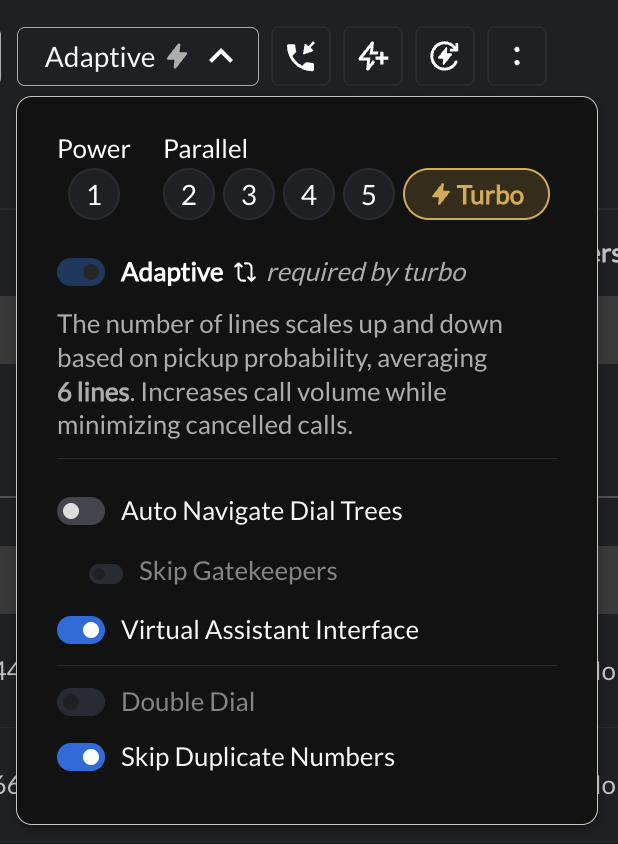
Turbo Dialing uses the same pick prediction model as Adaptive Dialing but is tuned for higher volume. It accepts a higher level of pickup risk before it stops adding lines, allowing Nooks to run more parallel lines and place calls more aggressively. In practice, Turbo Dialing averages approximately 6 lines at a time.
Turning On Adaptive or Turbo Dialing
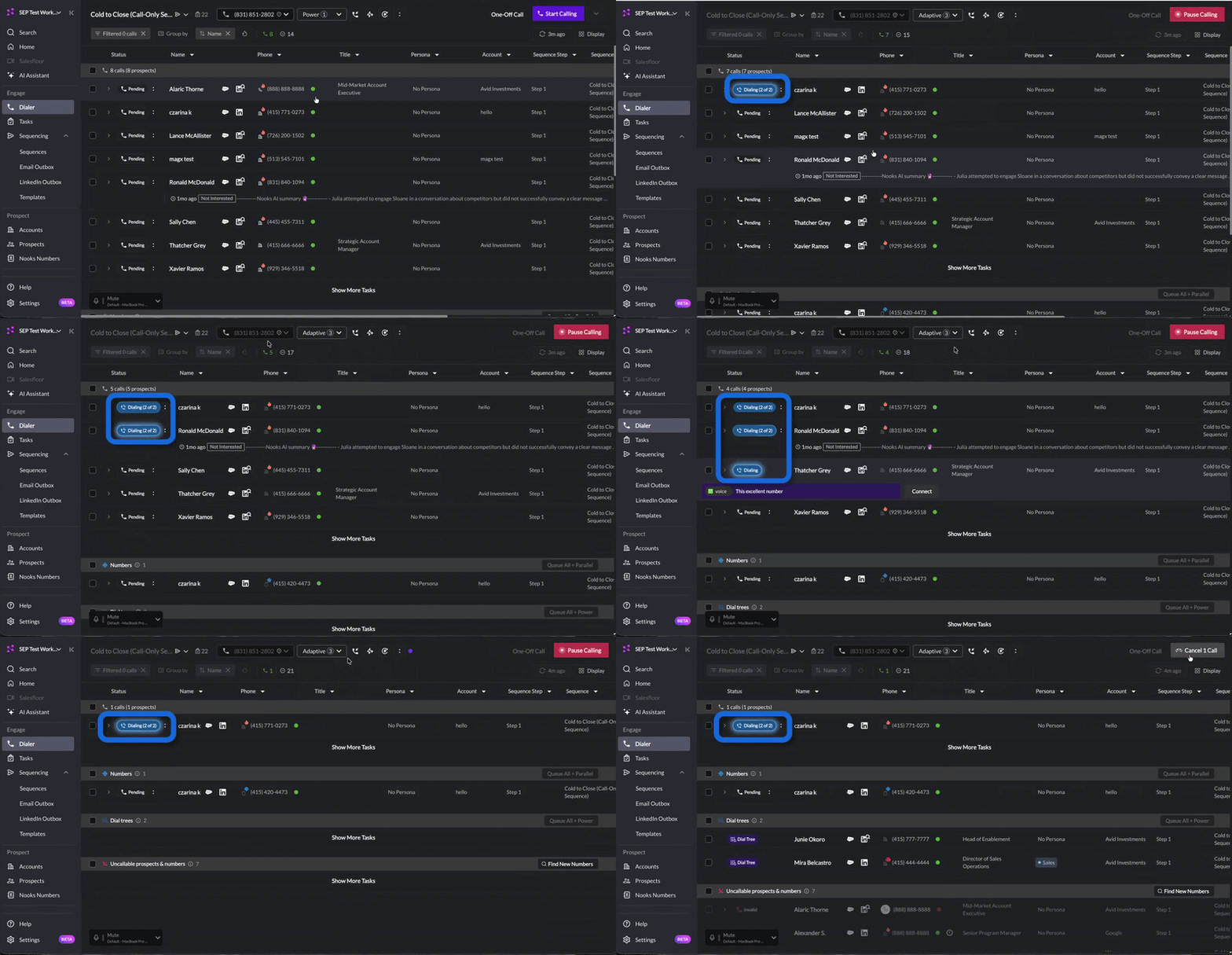
Adaptive and Turbo Dialing are available from the Dialing Mode menu in the Dialer. Turbo builds on Adaptive, so enabling Turbo automatically enables Adaptive as well.
To enable these features:
Open the Dialing Mode dropdown and choose your base line count (2–5 lines).
Turn on the Adaptive toggle.
The Adaptive toggle will not show up if your line count is set to Power-1.
To maximize dialing volume, click the Turbo option to the right of your line-count buttons. This automatically turns Adaptive Dialing on for you.
How to Determine How Many Lines Are Running
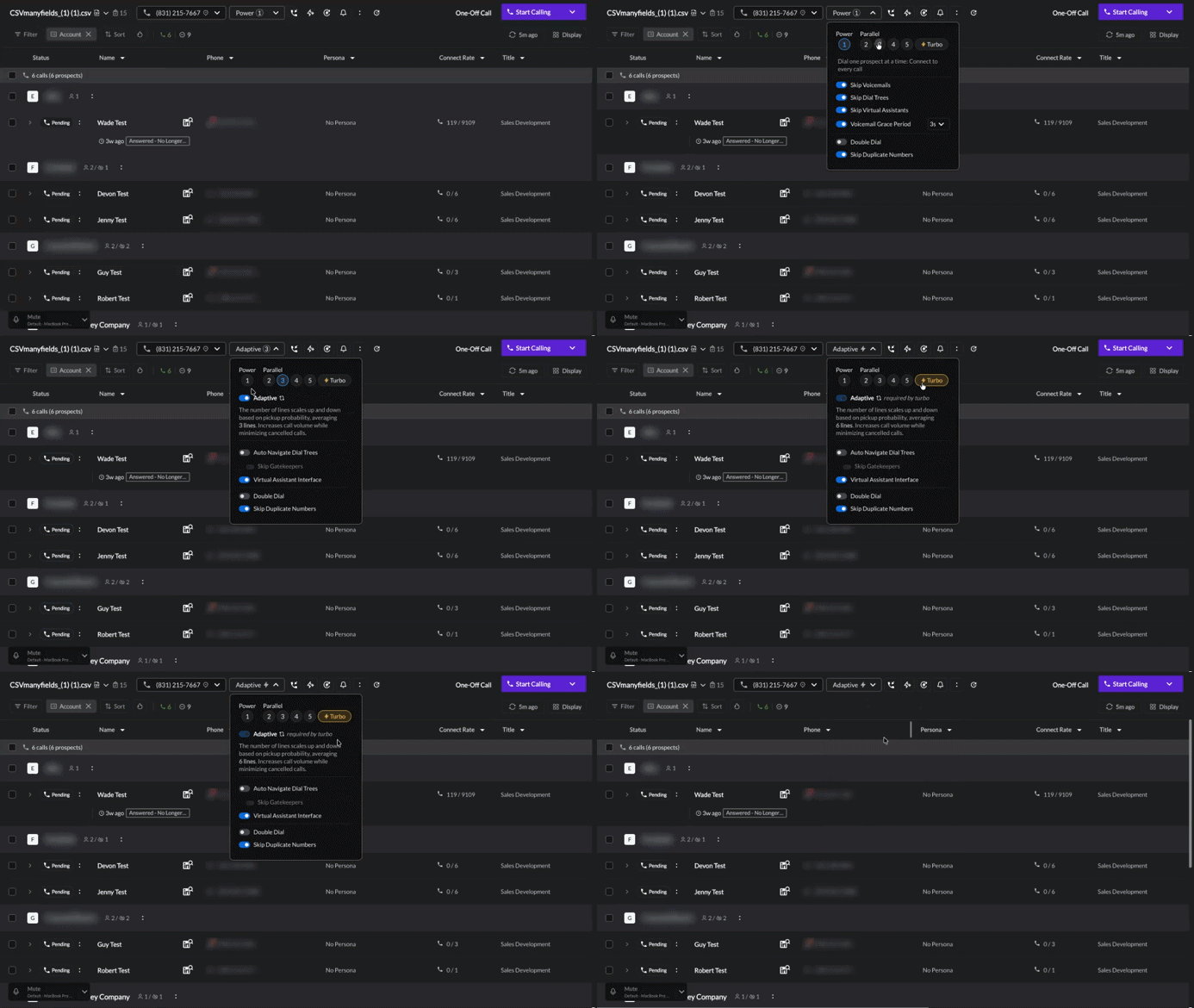
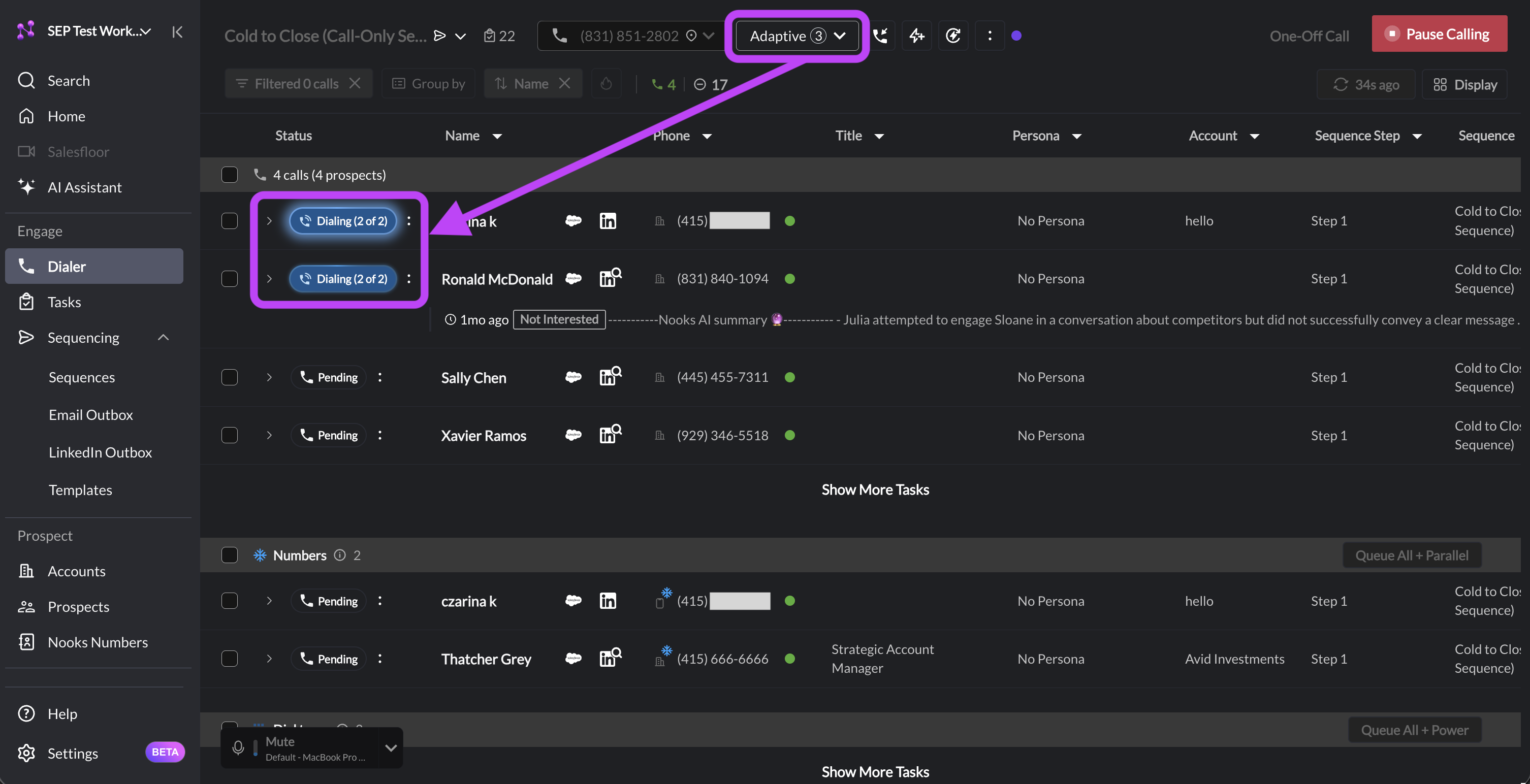
Once you start calling with Adaptive and Turbo Dialing, check the Status column on the left to see which call tasks are being dialed. That number will rise and fall automatically as Nooks adds or removes lines based on each number’s pickup probability.
Depending on how likely Nooks predicts it is for a number to pick up, your line count may drop to a single line. This behavior is most common with "hot" numbers.
Which Dialing Mode to Use When
Think of the four dialing modes as different points along the same spectrum. As dialing volume increases, so does the potential for cancelled calls. Each mode balances that trade off differently.
The table below outlines how to choose a dialing mode based on your dialing list and level of experience.
Mode | Lines at Once | How Line Count Is Decided | Typical Volume* | Best For |
Power | 1 (fixed) | N/A – Power Dialing always operates at 1 line. | ~40–60 dials/hour | Highly-targeted outreach; warm prospects. |
Parallel | 2–5 (fixed, your choice) | You manually pick a fixed count. | ~80–120 dials/hour | Reps comfortable managing their own connect-rate/cancel-rate trade-off. |
Adaptive | Scales around your chosen 2–5 base | Nooks adjusts every second based on live pickup probability | Similar to or better than the equivalent fixed Parallel count, with fewer cancels. | Lists that have a mix of “hot” and “cold” numbers; most users. |
Turbo | Averages 6 | Nooks adjusts every second based on live pickup probability. | Highest of all four modes. | High-volume, cold-list outreach where maximizing dial count matters most. |
*Typical volume rates are directional. The average volume rates for your Workspace may differ.
Best Practices
Use these recommendations to choose the dialing mode that is best for your list level and experience.
New to Parallel Dialing? Start with 2-line Adaptive. Rather than jumping straight to a high fixed count or Turbo, 2-line Adaptive gives you the safety of Nooks’ pickup probability predictions while you get a feel for Parallel Dialing.
Select a reasonable base line count. Even on Adaptive, the line count you start from matters: Nooks flexes your number of active lines around the base you select rather than ignoring it. Review the mix of hot and cold numbers in your dial list (shown by the pickup likelihood icons next to each number), then choose a base line count accordingly.
Use Turbo on high-volume cold-lists when placing more dials is the priority. Stick to Adaptive (or a fixed Parallel count) for smaller or warmer lists where you are already converting well.
FAQs
If Adaptive Dialing is automatically adjusting my line count, does my starting line count still matter?
Nooks still recommends choosing a sensible base line count for your list. Adaptive Dialing uses your selected line count as a starting point, then scales up and down from there depending on a number’s pickup probability rather than ignoring it altogether. Think of your base line count as the average number of lines you want running at one time.
What is the difference between Turbo and a fixed Parallel-5 count?
Parallel-5 always runs exactly 5 lines. Turbo runs Adaptive Dialing’s pickup-probability algorithm with a higher risk tolerance, so its line count moves dynamically and averages around 6. In practice, this means that Turbo dialing can go both higher and lower than 5 lines depending on which numbers you are currently calling.
Will Adaptive Dialing ever drop to a single line, or does it stay within a Parallel Dialing range?
Adaptive Dialing can drop as low as 1 line on numbers Nooks estimates are very likely to pick up, such as “hot” numbers. This happens even when the base line count you’ve selected is on the higher end of the spectrum (e.g., 4 or 5 lines).
Who can use Adaptive and Turbo Dialing?
Adaptive Dialing and Turbo Dialing are available to anyone with a Parallel Dialing seat. Adaptive and Turbo Dialing also require that your Workspace has data sharing enabled, since both models rely on Nooks’ pickup-likelihood predictions.
Why is the Adaptive Dial toggle grayed out?
The Adaptive Dial toggle appears grayed out (force enabled) when you have Turbo Dialing turned on. Turbo Dialing layers upon Adaptive Dialing, so it is not possible to have Turbo Dialing on but Adaptive Dialing off.