Nooks Activity Writeback to HubSpot
Last updated: September 15, 2026
This guide covers how Nooks logs Sequencing activity to HubSpot. It identifies the HubSpot activity record Nooks creates for each Nooks task type, the fields populated on that record, and the timing for activity logging.
For information on Meeting write-back to HubSpot, see Nooks Meeting Write-Back for HubSpot instead.
Applies to: This content applies to HubSpot Workspaces with Nooks Sequencing enabled.
Overview
Once your Workspace is connected to HubSpot via OAuth, Nooks automatically logs your team’s future Nooks Sequencing activity to HubSpot as HubSpot activities. This keeps HubSpot as your system of record and allows you to report on Nooks activity natively in HubSpot.
HubSpot has several distinct activity object types. Each Nooks activity type maps to the HubSpot object that fits it best.
Nooks Activity | Activity Direction | HubSpot Activity Created |
|---|---|---|
Outbound | Email activity | |
Inbound | Email activity | |
Call | Outbound | Call activity |
Call | Inbound | Call activity |
LinkedIn Connection Request | Outbound | Task activity |
LinkedIn Message | Outbound | Communication activity (channel: LinkedIn) |
LinkedIn Message | Inbound | Communication activity (channel: LinkedIn) |
SMS | Outbound | Communication activity (channel: SMS) |
SMS | Inbound | Communication activity (channel: SMS) |
Action Item (Basic Task) | — | Task activity |
Whenever Nooks logs an activity to HubSpot, the following holds true.
Every activity is associated to the actioned prospect’s HubSpot Contact record. If that Contact has an associated Company, the activity is associated to that Company record as well. Once associated, the activity surfaces on the Contact’s and Company’s activity timeline in HubSpot.
The activity is owned by the HubSpot user who corresponds to the Nooks rep who performed the task. For most activity types, that user is whoever actually completed the activity. The only exception is LinkedIn Messages and Action Items, for which the activity is always owned by the task’s assigned Nooks rep, even if a different user completed it.
Nooks activity is tagged in the HubSpot activity’s body or subject text. For example, the body of a Nooks LinkedIn message activity is prefixed with bracketed tags in the format [Nooks] [Activity: LinkedIn Message] [Direction: Outbound] [Sequence: <name>]. These tags help you distinguish activities created by Nooks from ones created manually or by other tools when reporting.
Activity Details
Whenever Nooks logs an activity to HubSpot, it populates certain standard HubSpot properties by default. This section lists the values Nooks writes to these properties.
Outbound Emails
Nooks logs reps’ successfully delivered outbound email activity to HubSpot in the following cases:
Emails sent from a Nooks Sequence (manual or automated).
One-off emails and manual email tasks sent from Nooks.
Emails sent directly from Gmail or Outlook if the user has the Gmail/Outlook Import setting enabled and the email has a HubSpot Contact recipient.
Nooks logs reps’ outbound emails to HubSpot as an Email activity with the following properties.
HubSpot Property Name | HubSpot Property | Value |
|---|---|---|
Email subject |
|
|
Email body |
| The email body (inline images are stripped before logging) |
Email Direction |
|
|
Email send status |
|
|
Email From Address |
| The From address on the email |
Email To Address |
| All of the To addresses on the email |
Activity date |
| The date and time of the email send |
Activity assigned to |
| The HubSpot user mapped to the sending Nooks user |
Associations: The following records are associated to the HubSpot activity record.
Contact: The prospect who was the primary recipient of the email.
Company: The Company associated with that Contact, if one exists.
Inbound Emails
Nooks logs inbound emails only if they are threaded replies to an email sent through Nooks. Nooks logs these emails to HubSpot as a separate Email activity record from the preceding outbound email, with the following properties populated.
HubSpot Property Name | API Name | Value |
|---|---|---|
Email subject |
|
|
Email body |
| The email body (inline images are stripped before logging) |
Email Direction |
|
|
Email send status |
|
|
Email From Address |
| The From address on the email |
Email To Address |
| All of the To addresses on the email |
Activity date |
| Time of send |
Activity assigned to |
| The HubSpot user mapped to the sending Nooks user |
Associations: The following records are associated to the HubSpot activity record.
Contact: The prospect who sent the email.
Company: The Company associated with that Contact, if one exists.
Outbound Calls
Nooks logs calls placed or logged in the Nooks Dialer, including one-off dials, to HubSpot as a Call activity. These calls include:
Calls from a Sequence.
Calls from a manual call task.
One-off dials.
When logging a call, Nooks populates the following properties on the HubSpot Call activity.
HubSpot Property Name | API Name | Value |
|---|---|---|
Call title |
|
|
Call notes |
| Call notes/description (optionally, the AI-generated summary, if enabled for your Workspace) |
Call duration |
| Call length in seconds |
From number |
| The from number on the call |
To Number |
| The to number on the call |
Call status |
|
|
Call direction |
|
|
Call outcome |
| The HubSpot call disposition that corresponds to the disposition the rep selected in Nooks. |
Recording URL |
| Link to the Nooks call recording. This property is only populated for calls that were recorded. |
Activity date |
| Time of the call |
Activity assigned to |
| The HubSpot user mapped to the calling Nooks rep |
Associations: The following records are associated to the HubSpot activity record.
Contact: The prospect the call was placed to.
Company: The Company associated with that Contact, if one exists.
Inbound Calls
Nooks logs any inbound calls or callbacks users field and log in the Nooks Dialer to HubSpot as a Call activity. When logging an inbound call, Nooks populates the following properties on the HubSpot Call activity.
HubSpot Property Name | API Name | Value |
|---|---|---|
Call title |
|
|
Call notes |
| Call notes/description (optionally, the AI-generated summary, if enabled for your Workspace) |
Call duration |
| Call length in seconds |
From number |
| The from number on the call |
To Number |
| The to number on the call |
Call status |
|
|
Call direction |
|
|
Call outcome |
| The HubSpot call disposition that corresponds to the disposition the rep selected in Nooks. |
Recording URL |
| Link to the Nooks call recording. This property is only populated for calls that were recorded. |
Activity date |
| Time of the call |
Activity assigned to |
| The HubSpot user mapped to the calling Nooks rep |
Associations: The following records are associated to the HubSpot activity record.
Contact: The prospect who called.
Company: The Company associated with that Contact, if one exists.
LinkedIn Connection Requests (Outbound Only)
Nooks logs outbound LinkedIn Connection Requests sent from a Sequence step as a Task activity with the following properties.
HubSpot Property Name | API Name | Value |
|---|---|---|
Task title |
|
|
Task notes |
|
|
Task status |
|
|
Task type |
|
|
Due date |
| The time the Connection Request was sent |
Assigned to |
| The HubSpot user mapped to the Nooks rep who sent the Connection Request |
Associations: The following records are associated to the HubSpot activity record.
Contact: The prospect the LinkedIn Connection Request was sent to.
Company: The Company associated with that Contact, if one exists.
There is no separate “accepted” or reply activity for Connection Requests. Review the LinkedIn Outbox for updates on a Connection Request’s status.
Note: Nooks does not log Connection Requests sent from LinkedIn directly or via an external third-party integration.
Outbound LinkedIn Messages
Nooks logs LinkedIn Messages to HubSpot in the following cases:
Automatic and manual LinkedIn message sent from a Sequence substep.
Manual LinkedIn messages sent from a Sequence step or one-off task.
LinkedIn messages sent directly from LinkedIn in a conversation initiated via Nooks.
Nooks logs outbound LinkedIn Messages as a Communication activity with the LinkedIn Message channel type. Nooks populates the following properties on the HubSpot activity.
HubSpot Property Name | API Name | Value |
|---|---|---|
Channel type |
|
|
Logged from |
|
|
Communication body |
|
|
Activity date |
| The time the message was sent |
Activity assigned to |
| The HubSpot user mapped to the Nooks task’s assigned rep. |
Associations: The following records are associated to the HubSpot activity record.
Contact: The prospect the LinkedIn message was sent to.
Company: The Company associated with that Contact, if one exists.
Inbound LinkedIn Messages
Nooks logs inbound LinkedIn messages as a Communication activity with the LinkedIn Message channel type in HubSpot.
Nooks only logs inbound LinkedIn messages if they are replies in a conversation initiated by Nooks. Nooks does not log LinkedIn messages from conversations for which you have never used Nooks to send a LinkedIn message to the recipient, ensuring your personal LinkedIn messages remain private.
When Nooks logs an inbound LinkedIn message, Nooks populates the following properties on the HubSpot activity.
HubSpot Property Name | API Name | Value |
|---|---|---|
Channel type |
|
|
Logged from |
|
|
Communication body |
|
|
Activity date |
| The time the message was sent |
Activity assigned to |
| The HubSpot user mapped to the Nooks rep who received the LinkedIn Message |
Associations: The following records are associated to the HubSpot activity record.
Contact: The prospect who sent the LinkedIn Message.
Company: The Company associated with that Contact, if one exists.
Outbound SMS Messages
Nooks logs outbound SMS messages sent via the Nooks Dialer as Communication activity in HubSpot with the SMS channel type. SMS messages eligible for logging include:
Automatic and manual SMS messages sent from a Nooks Sequence step.
SMS messages sent one-off or via a one-off task.
SMS messages sent from the SMS Outbox.
When Nooks logs an SMS message, Nooks populates the following properties on the HubSpot activity.
HubSpot Property Name | API Name | Value |
|---|---|---|
Channel type |
|
|
Logged from |
|
|
Communication body |
|
|
Activity date |
| The time the message was sent |
Activity assigned to |
| The HubSpot user mapped to the Nooks rep who sent the SMS message |
Associations: The following records are associated to the HubSpot activity record.
Contact: The prospect the SMS message was sent to.
Company: The Company associated with that Contact, if one exists.
Note: For Nooks to log an SMS message, the recipient must have a Contact record in HubSpot. SMS messages sent to phone numbers that are not found on a HubSpot Contact record are not logged and remain visible only in Nooks.
Inbound SMS Message
Nooks logs inbound SMS messages received at your Nooks phone number as Communication activity in HubSpot with the SMS channel type.
When Nooks logs an SMS message, Nooks populates the following properties on the HubSpot activity.
HubSpot Property Name | API Name | Value |
|---|---|---|
Channel type |
|
|
Logged from |
|
|
Communication body |
|
|
Activity date |
| The time the message was sent |
Activity assigned to |
| The HubSpot user mapped to the Nooks rep who received the SMS Message |
Associations: The following records are associated to the HubSpot activity record.
Contact: The prospect who sent the SMS message.
Company: The Company associated with that Contact, if one exists.
Note: For Nooks to log an SMS message, the sender must have a Contact record in HubSpot. SMS messages sent to phone numbers that are not found on a HubSpot Contact record are not logged and remain visible only in Nooks.
Action Items
Nooks logs Action Item tasks to HubSpot as a Task activity with the following properties. This includes Action Items completed from a Sequence step and those completed from a one-off task.
HubSpot Property Name | API Name | Value |
|---|---|---|
Task title |
|
|
Task notes |
| Any content in the Nooks task’s Notes field at the time of logging |
Task status |
|
|
Task Type |
|
|
Due date |
| The time the Action Item was completed in Nooks |
Priority |
|
|
Assigned to |
| The HubSpot user mapped to the Nooks rep assigned to the task |
Associations: The following records are associated to the HubSpot activity record.
Contact: The prospect the activity was with.
Company: The Company associated with that Contact, if one exists.
Writeback Timing
Nooks logs activities to HubSpot asynchronously in the background after each activity is completed in Nooks. Activities should appear in HubSpot in near-real time.
Troubleshooting
Below are troubleshooting recommendations for common issues with HubSpot activity logging.
Activities Not Appearing in HubSpot
When an activity does not surface on a Contact or Company’s activity timeline in HubSpot, look into the following potential causes.
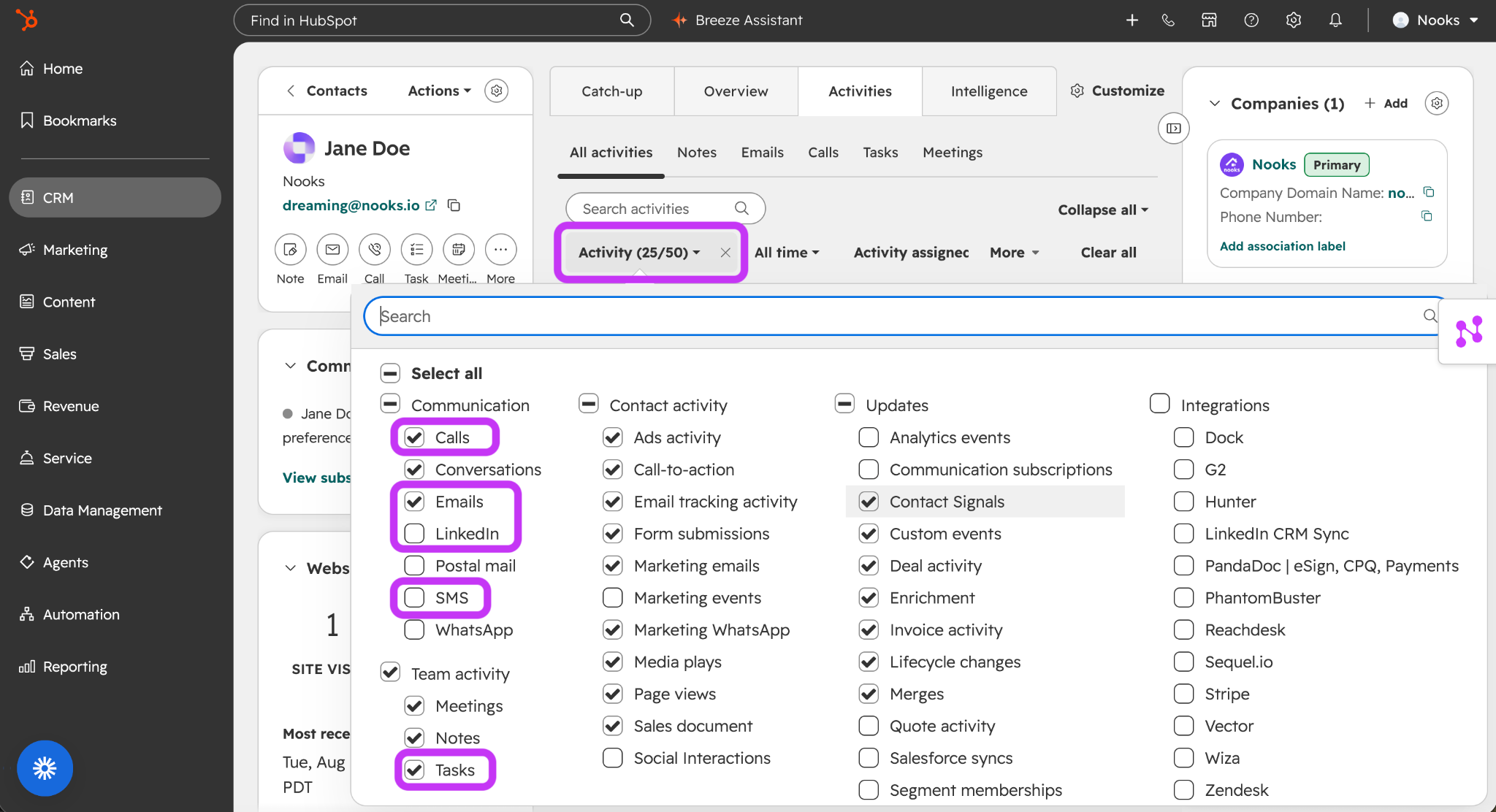
Activity Filter: Check that all activity types Nooks logs to HubSpot are included in your Activity filter. When viewing a record, click the Activity filter, then enable the following activity types: Calls, Emails, LinkedIn, SMS, and Task. Commonly, LinkedIn and SMS are not enabled in this filter, which may make it seem as if LinkedIn Message and SMS activities are not logging when really they are just filtered out.
Duplicate Records: Check that there are not duplicate records in HubSpot for the prospect or company you engaged with. The activity may be associated to that record instead.
If you still do not see the activity you are looking for, contact Nooks Support for additional assistance.
FAQs
When does Nooks log an activity to HubSpot?
Nooks logs an activity to HubSpot once the assigned rep has completed it in Nooks. Nooks does not log open (pending completion) activities, nor activities that are skipped or deleted in Nooks. Activities are logged to HubSpot asynchronously and may take up to 3 minutes to appear in your CRM.
Can email opens, clicks, and replies be written to the corresponding Email activity record in HubSpot?
Nooks does not write email opens, link clicks, or replies on a tracked email to the corresponding Email activity record in HubSpot. The best place to view these metrics is the Email Outbox in Nooks.
If you need email tracking metrics in HubSpot to trigger CRM automations, explore using a Nooks Automation to accomplish your goal. You can use various email outcomes (e.g., email delivered, email replied, email opened, email bounced, etc.) to automatically trigger subsequent actions, such as Contact and Company CRM field updates, Sequence enrollment or removal, etc.
Will Nooks log my personal LinkedIn messages to HubSpot?
Nooks does not log personal LinkedIn messages to HubSpot. Nooks only logs LinkedIn messages to HubSpot if they are in conversations initiated via Nooks.
If you have never used Nooks to send a LinkedIn message to a person, Nooks does not see or log any LinkedIn Messages from your conversation. If you use Nooks to send a LinkedIn message to a person who you have previously only sent LinkedIn messages to outside of Nooks, Nooks only logs the LinkedIn messages (outbound and inbound) you have with that person from that Nooks-sent message onward.
This model helps ensure that Nooks captures all your CRM-relevant LinkedIn messages without recording personal messages you send.
Does Nooks populate an email’s CC and BCC recipients on the HubSpot activity record?
No. Nooks only populates the email’s To-line and From-line recipients on the HubSpot activity record. All the recipients in the To line are recorded in the “Email To Address” property in Hubspot; the sending address is recorded in the “Email From Address” property in HubSpot.
As the CC and BCC lines may be used to copy private recipients, Nooks intentionally omits these from the logged HubSpot record.