Strategies to Increase Your Connect Rates
Last updated: September 24, 2026
This article covers ways to leverage Nooks features to maximize your connect rates to get as many conversations as possible during your Nooks call blitzes.
The list of best practices are as follows:
Add a minimum of 100 new prospects per week to your sequences, ideally those with mobile numbers. This will ensure you have fresh data and don’t keep redialing the same stale list.
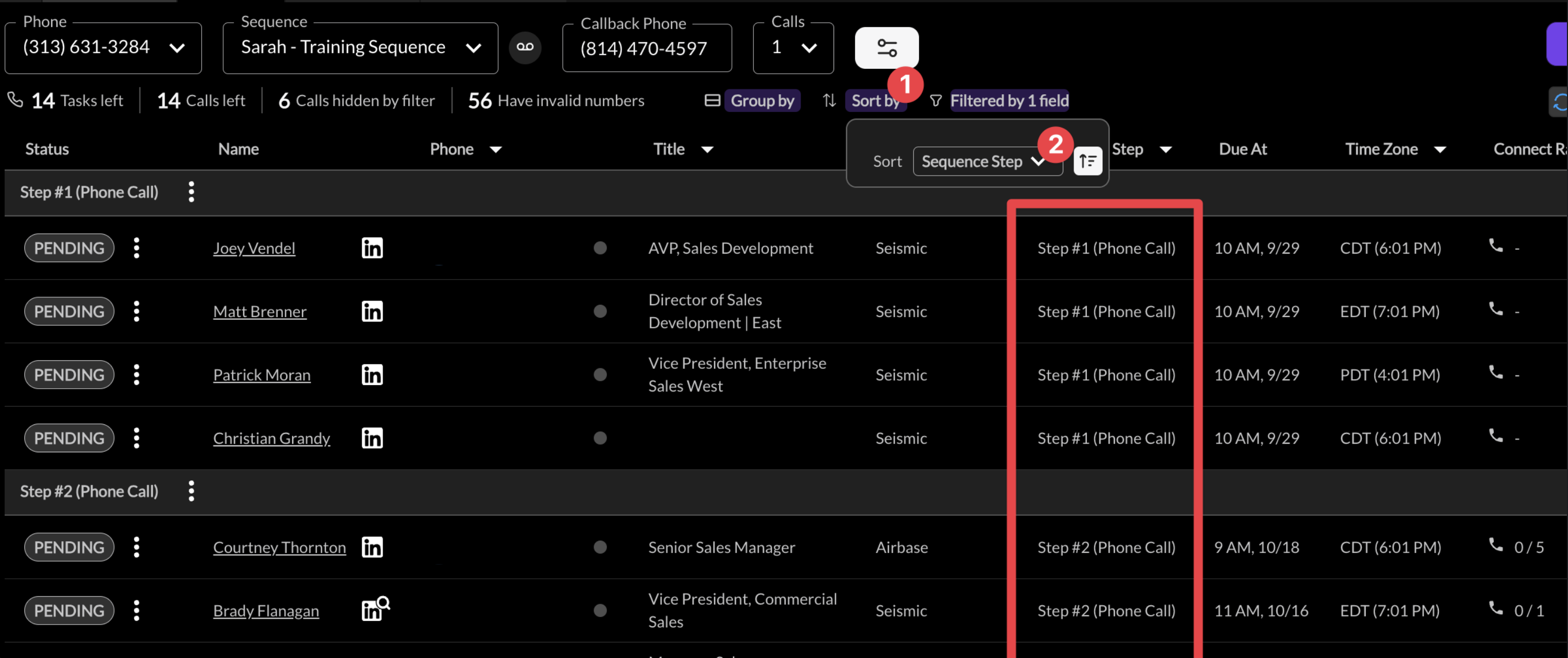
Prioritize calling people in early steps of a sequence since they’ve never been called before to maximize connects. We recommend sorting by step to ensure this happens.
Filter to dial mobile numbers first. Our data shows mobile numbers have 2X the connect rate of work lines.
Remove invalid numbers after connects. If a prospect's number is invalid, click the colored status dot next to that number in the dialer and choose Invalid. Nooks stops dialing it and moves it to the Uncallable section. Admins can also have Nooks do this automatically: map which dispositions count as a wrong number, then in the phone number automation settings turn on "A call is dispositioned as a wrong number". After that, choosing a wrong-number disposition marks the dialed number invalid for you.
Leave an impactful voicemail. Prospects will give at least 10-15 seconds of their time to check a voicemail, or just read the transcript
Rotate your numbers. To lower the chance of a number getting flagged as spam, turn on Auto-rotate my number at 60 calls in your phone number drop-down in the dialer. Once a number has made 60 dials in a day, Nooks switches you to another number already in your list; the count resets every day. Nooks only rotates between numbers you already have, prefers one with the same area code, and skips numbers that are flagged as spam or have already reached 60 dials today. If none of your numbers are eligible, you'll be prompted to create a new number. Admins can also turn auto-rotate on for everyone in the workspace, and it turns on automatically when you use Smart Presence. The 60-dial threshold is a recommendation, not a hard limit: you can still choose a number manually and keep dialing with it.
Review each sequence to understand its connect rate as different lists and different personas will have different connect rates. Go to our "Reporting" tab and then "Sequences" to see connect rate broken down by sequence.