User Profile Settings
Last updated: October 1, 2026
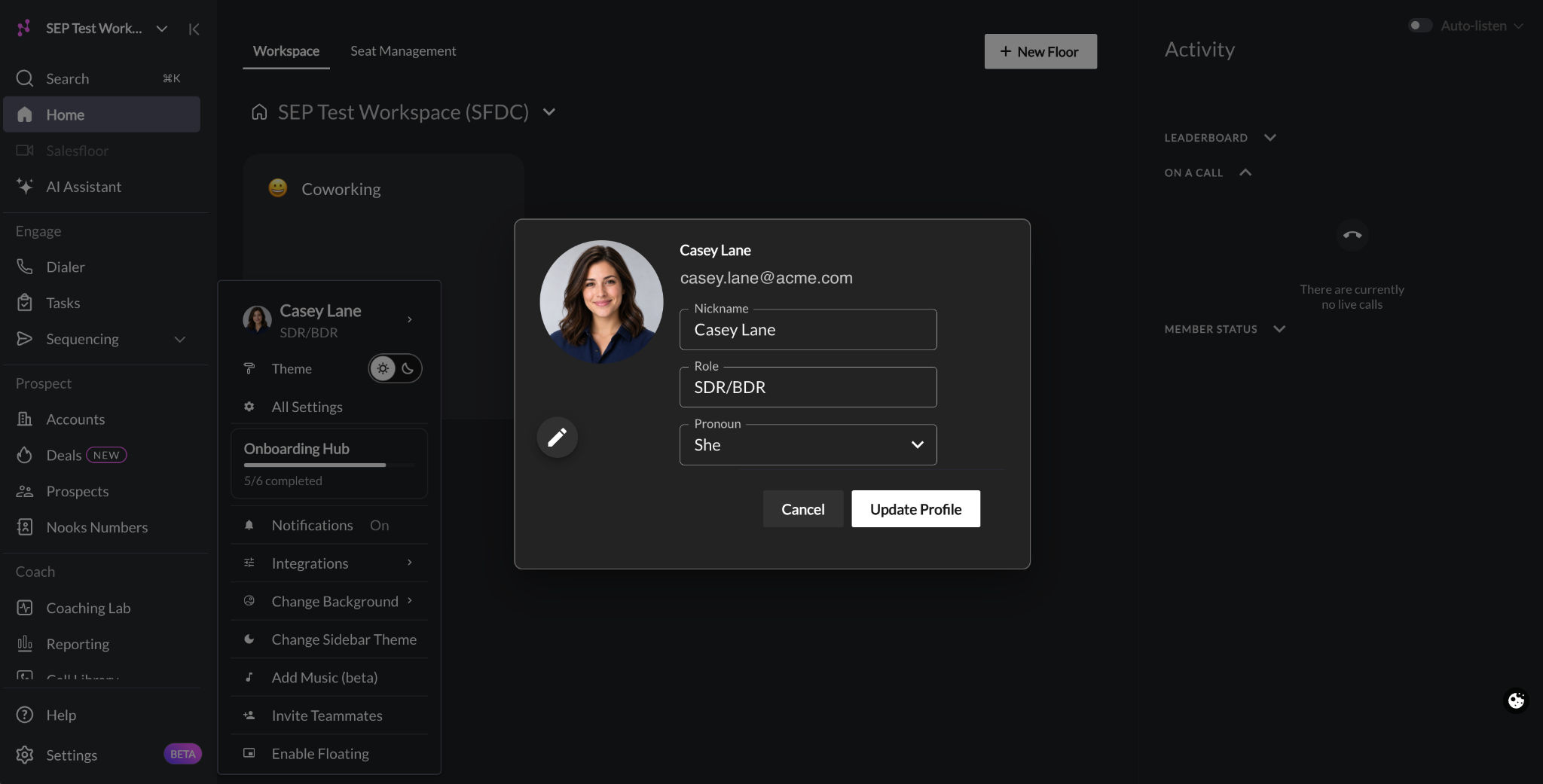
This guide covers the user-level profile settings in Nooks. It explains what each setting in the Edit Profile window does, how to update your profile, and how your profile personalizes different Nooks features.
Applies To: All Nooks users. Some settings only affect users with a Nooks Sequencing seat or a Dialer seat, as noted in each section.
Overview
Your profile tells Nooks who you are. Nooks uses it to fill in emails and calendar invites, to show your photo to teammates, and to give Nooks AI content when it writes emails and call summaries.
In your profile, you can:
Set the name Nooks uses for you in emails, invites, and across the app.
Add a profile photo.
Tell Nooks your role.
Set your pronouns for AI call summaries.
Before You Begin
You do not need any special permissions or seat assignments to edit your profile. Every user can update their own profile.
Admins cannot edit another user’s profile on their behalf. If a teammate’s name is wrong, ask them to update their profile settings.
How Profile Settings Work
Each setting in the Profile window is used in different places. Your name and email address appear at the top of the window, but cannot be edited there. Your name updates after you change your Nickname and save.
The following table summarizes each setting and where Nooks uses it.
Setting | Required | Where Nooks Uses It |
|---|---|---|
Nickname | Yes | Your display name in Nooks (on the Salesfloor, in Reporting, and in User Management), AI call summaries, Sender Variables, the email From name, calendar invites, and AI-generated emails. |
Role | Yes | Your role label in the settings menu, and to personalize your Nooks experience. |
Pronoun | No | AI call summaries. |
Profile picture | No | Your avatar across Nooks, including the Salesfloor and record owner avatars. |
Nickname
Your Nickname is the name Nooks uses for you throughout the product. When you save it, it replaces your display name in Nooks.
Your Nickname must be between 1 and 40 characters. We recommend entering your full name in “First Last” format.
Across the product, Nooks uses your Nickname to:
Set your name in User Management: Your nickname appears to your Workspace admin team in Seat Management, Members settings, and Teams settings.
Set your name in Reporting: Nooks uses your Nickname to identify you and attribute activities to you across Nooks reporting.
Set your name on the Salesfloor: Nooks uses your Nickname as your display name on the Salesfloor.
For users with a Nooks Sequencing seat, Nooks also uses your Nickname to:
Fill Sender and Variables: Nooks sets
{{sender.first_name}}to the first word of your Nickname and{{sender.last_name}}to everything after the first space. For example, a Nickname of “Jordan Lee” producesJordanandLee. A Nickname of “Jordan” leaves{{sender.last_name}}blank.Set the From name on your email: Prospects see your Nickname as the sender name in their inbox, unless a different Sender Name is configured for the alias you send from.
Set your name in Owner filters: Your name appears in record ownership filters in places including, but not limited to, the Prospects page, the Accounts page, the Email Outbox, the LinkedIn Outbox.
Write AI-generated emails: When Nooks AI writes emails on your behalf, it uses your Nickname as the sender name.
Important for Nooks Sequencing Users: If your nickname is your email address or a short informal name, emails can go out to your prospects with that text in place of your name. Before you send emails from Nooks Sequencing, check that your Nickname is the full name you go by professionally.
Role
Role describes your job, such as SDR/BDR or Account Executive. It appears under your name at the top of the Settings menu.
Role is not the same as your Nooks user role. Changing your profile’s role does not change your permissions in Nooks. To change your user role and, thus, user permissions, contact your Workspace admin.
You can select one of the following suggested roles or enter your own (up to 60 characters):
SDR/BDR
SDR/BDR Manager
Account Executive
Marketing
Sales Leader
Founder/CEO
Operations
Customer Success
IT Support
Nooks may ask you for your Role the first time you sign in. After you set a Role, you can change it, but you cannot clear it.
Pronoun
Pronoun is optional. Nooks AI uses your pronoun choice to refer to you in AI-generated call summaries. You can select one of the following options:
He
She
They
Profile Picture
Your profile picture is the avatar teammates see next to your name throughout Nooks, including on the Salesfloor and in owner fields on records. If you do not add a picture, Nooks uses your name’s initials as your avatar.
Updating Your Profile Settings
You can update your Nickname, Role, Pronoun, and Profile Picture at any time. To update your profile:
In the left-hand navigation menu, click Settings.
Hover over your name at the top of the Settings menu.
Click Edit Profile.
To change your Nickname: Enter your name in the Nickname field in “First Last” format.
To change your Role: Select the role that best describes your job from the dropdown menu or enter a custom one.
To change your Pronoun: Select your preferred pronoun from the dropdown.
Click Update Profile.
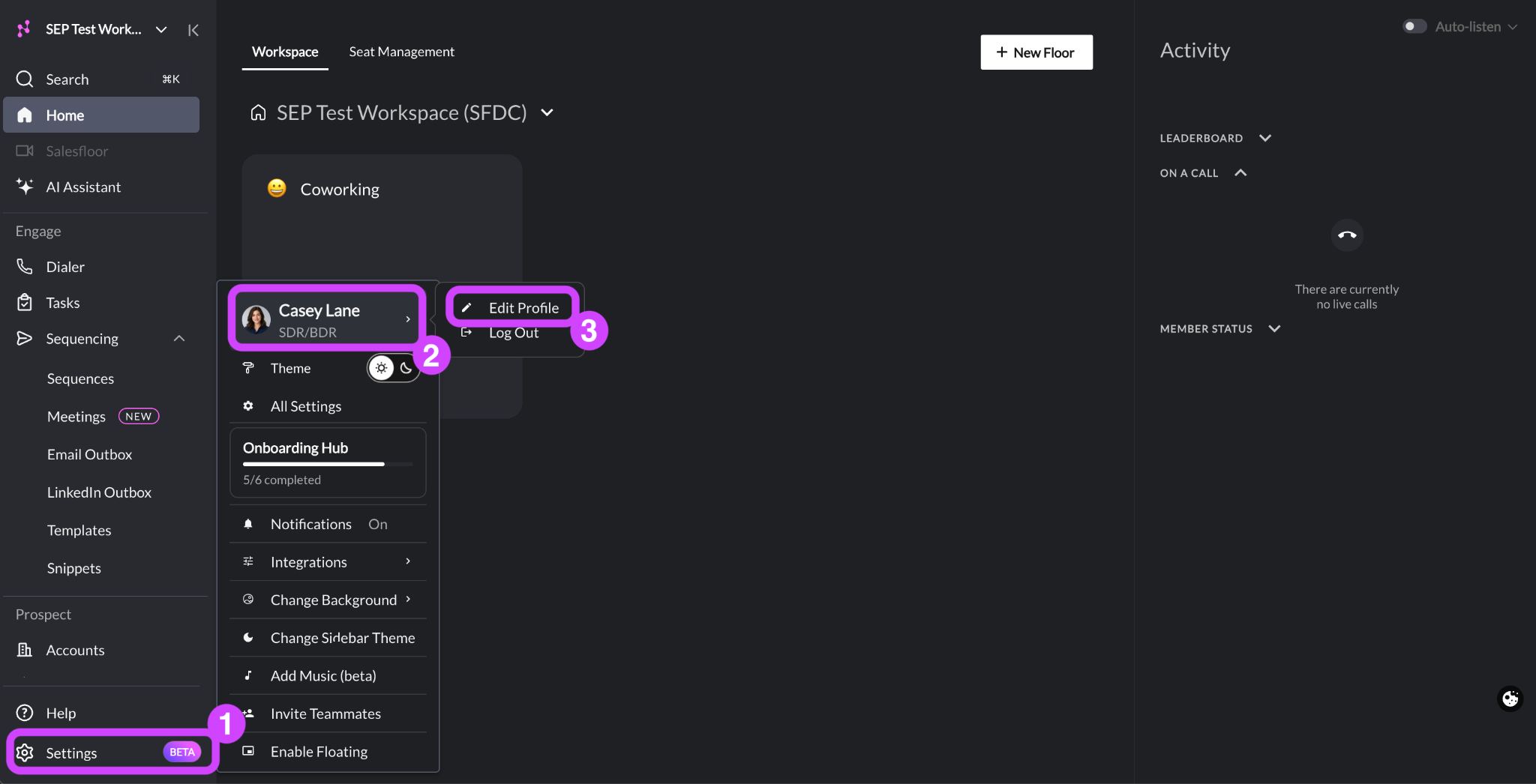
Changes take effect immediately. The Edit Profile window closes when the update is saved.
Updating Your Profile Picture
Your profile picture saves separately from your other profile settings. You can also change it at any time. To change your profile picture:
In the left-hand navigation menu, click Settings.
Hover over your name at the top of the Settings menu.
Click Edit Profile.
Click the Edit Profile Picture (pencil) icon at the lower-left of your current profile picture.
Select an image file from your computer.
Drag the crop area to frame your photo.
Click Confirm.
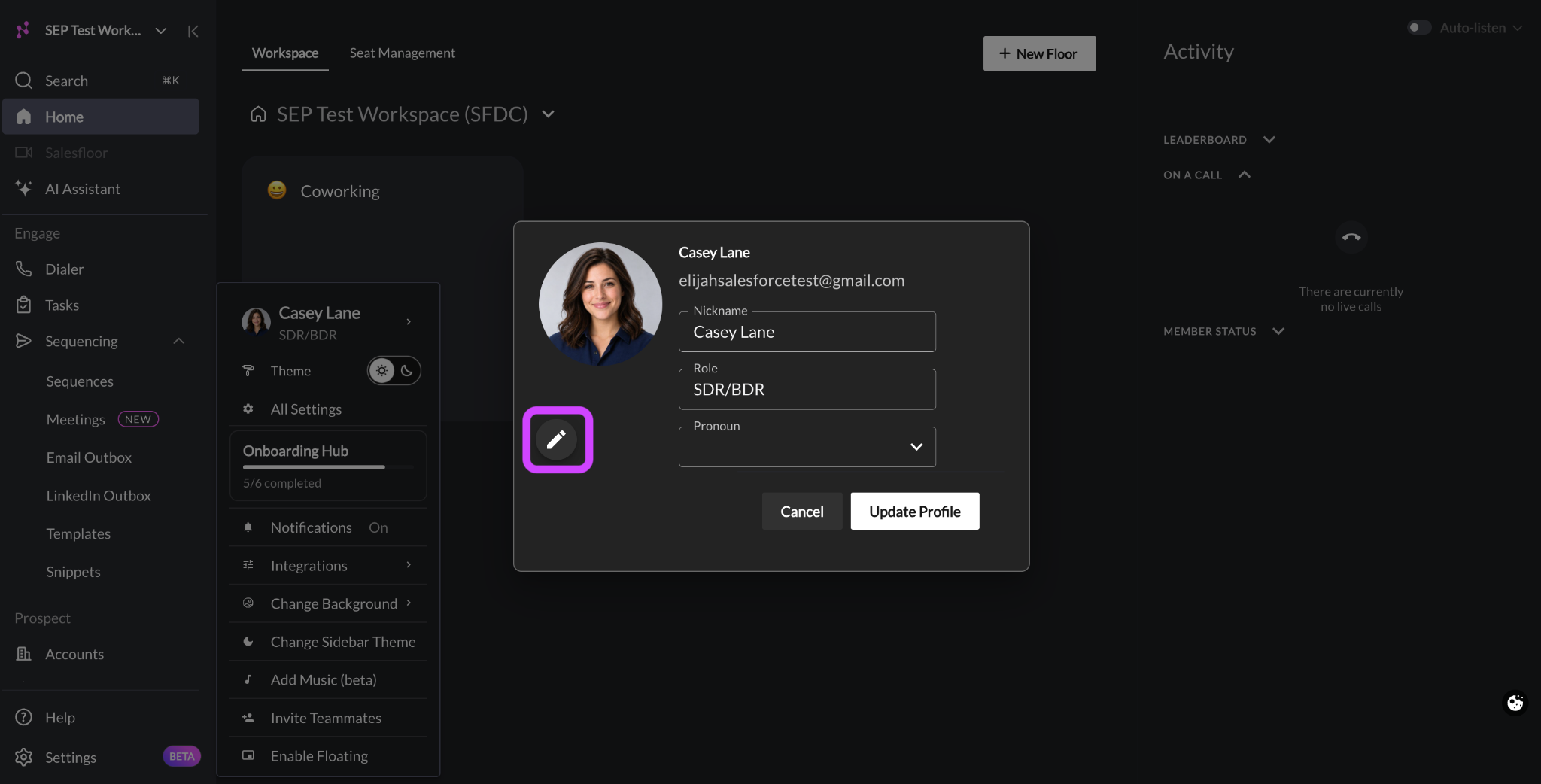
Nooks saves your new photo as soon as you click Confirm. You do not also need to click Update Profile in the Edit Profile modal, and clicking Cancel does not undo your profile picture change.
Troubleshooting
This section covers some common profile issues and how to resolve them.
Emails Show My Email Address Instead of My Name
If prospects report seeing your email address, or {{sender.first_name}} fills in with your email address, your Nickname is likely set to your email address. This can happen when your Nooks account is first created.
To fix this issue, update your Nickname to your full name.
My Last Name Is Blank in Emails
If {{sender.last_name}} comes out blank in your emails, your Nickname likely only has one word. Nooks automatically splits your Nickname into two to determine your first name and last name(s):
The first word is used as your first name.
Everything after the first space is used as your last name(s).
To fix this issue, update your Nickname to “First Last” format, such as “Jordan Lee.”
The Update Profile Button Does Not Close the Edit Profile Window
If you click Update Profile in the Edit Profile window but the window stays open, one of your profile settings likely does not meet the requirements. Review your Profile Settings for the following red errors.
Red Error Message | Solution |
|---|---|
Nickname: | The Nickname field is empty or longer than 40 characters. Enter a name between 1 and 40 characters. |
Role: | The Role field is empty. Select or enter a role. |
FAQs
Can my admin update my name for me?
No. Each user updates their own profile.
Does changing the Role in my Profile change my permissions?
No. Your profile’s Role is different from your user role. Your profile’s Role describes your job function. Nooks uses it to customize your user experience. Your permissions in Nooks come from your user role, which your Workspace admin team sets and manages.
Is Nickname different from my name?
No. In Nooks, Nickname is your name. There is no separate first and last name field. We recommend entering the full name you use professionally, in “First Last” format, because external prospects may see the name you enter.
Does my Gmail or Outlook display name affect my sender name in Nooks?
No. For emails sent through Nooks Sequencing, the sender name that displays in the prospect’s inbox provider comes from your Nooks Nickname, not your Gmail or Outlook account name.