Submitting a Regulatory Bundle for International Phone Numbers
Last updated: September 17, 2026
This guide walks through how to submit a Regulatory Bundle, the regulatory application required to unlock international phone number provisioning for a given country in Nooks. It covers which countries require a Regulatory Bundle, how to submit one, and how to check on its status.
Applies to: This feature is available to Workspaces with International seats enabled.
Overview
Many countries require proof of who you are and where your business is located before a telecom carrier will issue you a phone number in that country. A Regulatory Bundle is a package of business information and supporting documents that a local telecom regulator requires before it will issue you a phone number. Regulatory Bundles are required for almost all phone numbers outside the United States and Canada; numbers within those two countries follow the North American Numbering Plan and require no regulatory documentation.
Nooks partners with our third-party VoIP provider, Twilio, to collect, compile, and submit that information as a Regulatory Bundle directly within Nooks. The requirements for a Regulatory Bundle vary by country, since they are set by the local government or telecom authority in each country, not Nooks or Twilio. Because these requirements can change at any time without advanced notice, the best sources of truth are always Twilio’s regulatory requirements documentation by country and the Regulatory Bundle application form in Nooks Settings.
You only need to submit a Regulatory Bundle once for each country you want to dial from. After your Regulatory Bundle is approved, you can provision phone numbers from that country for your Workspace. A small portion of countries are classed as “Private Offering” phone numbers, where Nooks must also manually request the actual phone numbers from Twilio and the country’s local telecom providers, so plan for additional wait even after your approval.
Determine Your Eligibility
Before starting a Regulatory Bundle application, confirm that your company meets the requirements to provision phone numbers from your target country.
Nooks sorts supported countries into two tiers:
Included countries need no special approval from Nooks beyond having an International seat.
Approval-required countries are subject to additional review and provisioning timelines due to their higher International Number Credit cost. Consult your Nooks representative before submitting an application for these countries.
A handful of countries need no Regulatory Bundle submission at all. As of September 2026, that list includes:
Czechia (Czech Republic)
Israel
Sweden
Puerto Rico
For all other countries, plan to submit a Regulatory Bundle. Requirements vary by country, but you can generally expect to provide some combination of the following:
A business registration document, such as an EIN letter or SS-4 in the US, or a commercial register excerpt or equivalent company filing outside the US.
A business address, which for many countries must be located inside that country rather than anywhere in the world.
An authorized representative, which is an officially designated officer or employee who acts on behalf of your business to sign applications, verify identity, and take legal responsibility for phone number compliance on your business’s behalf. You may occasionally need to submit proof, sometimes including a government ID, that verifies your authorized representative’s identity and ties them to your business.
Country Availability and Requirements
The table below lists every country Nooks currently supports for Regulatory Bundle submission. For each country, review:
Number Type – The type of phone number Nooks supports for that country.
Requires Nooks Approval – Whether you need to consult your Nooks representative before submitting a bundle.
Regulatory Requirements – A link to Twilio’s country-specific resource listing all the information required for an application for this country. Scroll to the Requirements for Businesses section for the supported phone number type: Local, Mobile, or National.
Address Requirements – Where you must have a business entity in order to submit a Regulatory Bundle and obtain phone numbers from that country.
Country | Number Type | Requires Nooks Approval | Local Regulatory Requirements | Business Address Requirements |
|---|---|---|---|---|
Australia | Mobile | No | Within the country | |
Austria | National | No | Anywhere in the world | |
Belgium | Mobile | Yes | Within the country | |
Brazil | Local | No | Anywhere in the world | |
Chile | Local | No | Anywhere in the world | |
Colombia | Local | Yes | Anywhere in the world | |
Croatia | Local | Yes | Within the country | |
Czechia (Czech Republic) | National | No submission needed | No submission needed | No submission needed |
Denmark | Mobile | No | Within the country | |
Estonia | Mobile | No | Within the country | |
Finland | Mobile | No | Within the country | |
France | National | No | Within the country | |
Germany | Mobile | No | Within the country | |
Hong Kong | National | No | Within the country | |
Hungary | Local | Yes | Within the country | |
Iceland | Mobile | No | Within the country | |
Ireland | Local | No | Within the country | |
Israel | Local | No submission needed | No submission needed | No submission needed |
Italy | Local | No | Within the country | |
Luxembourg | Local | No | Within the country | |
Malaysia | Local | No | Within the country | |
Mexico | Local | No | Within the locality or region covered by the phone number’s prefix | |
Netherlands | Local | Yes | Within the locality or region covered by the phone number’s prefix | |
New Zealand | Local | No | Within the locality or region covered by the phone number’s prefix | |
Norway | Local | No | Within the locality or region covered by the phone number’s prefix | |
Poland | Local | No | Within the locality or region covered by the phone number’s prefix | |
Portugal | Mobile | Yes | Within the locality or region covered by the phone number’s prefix | |
Puerto Rico | Local | No submission needed | No submission needed | No submission needed |
Romania | National | No | Within the locality or region covered by the phone number’s prefix | |
Singapore | National (Level 3) | No | Anywhere in the world | |
South Africa | Mobile | Yes | Within the locality or region covered by the phone number’s prefix | |
Spain | Local | No | Within the locality or region covered by the phone number’s prefix | |
Sweden | Mobile | No submission needed | No submission needed | No submission needed |
Switzerland | Local | Yes | Within the locality or region covered by the phone number’s prefix | |
United Kingdom | Mobile | No | Anywhere in the world |
If you do not see a country you are interested in provisioning a phone number from, contact your Nooks representative to explore possible alternatives.
How to Read the Regulatory Requirements Documents
Phone numbers are provisioned as a country-and-type pair. When you open the link to Twilio’s Regulatory Requirement list:
Scroll to the section that corresponds to the country-type pair in the table above, for example Australia – Mobile, Italy – Local, or United Kingdom – Mobile.
Look for the table under Requirements for Businesses.
That table has three columns that identify the information you need to prepare for your submission, with one row per required piece of information.
Column | What It Tells You |
|---|---|
Information Required | The piece of information you need for your submission. |
Documentation Required | A description of the type of document needed to support that information, if any. |
Acceptable Documentation | The documents Twilio will accept as support. Choose one, and make sure the information you enter in the application form is an exact match to what's in the document. |
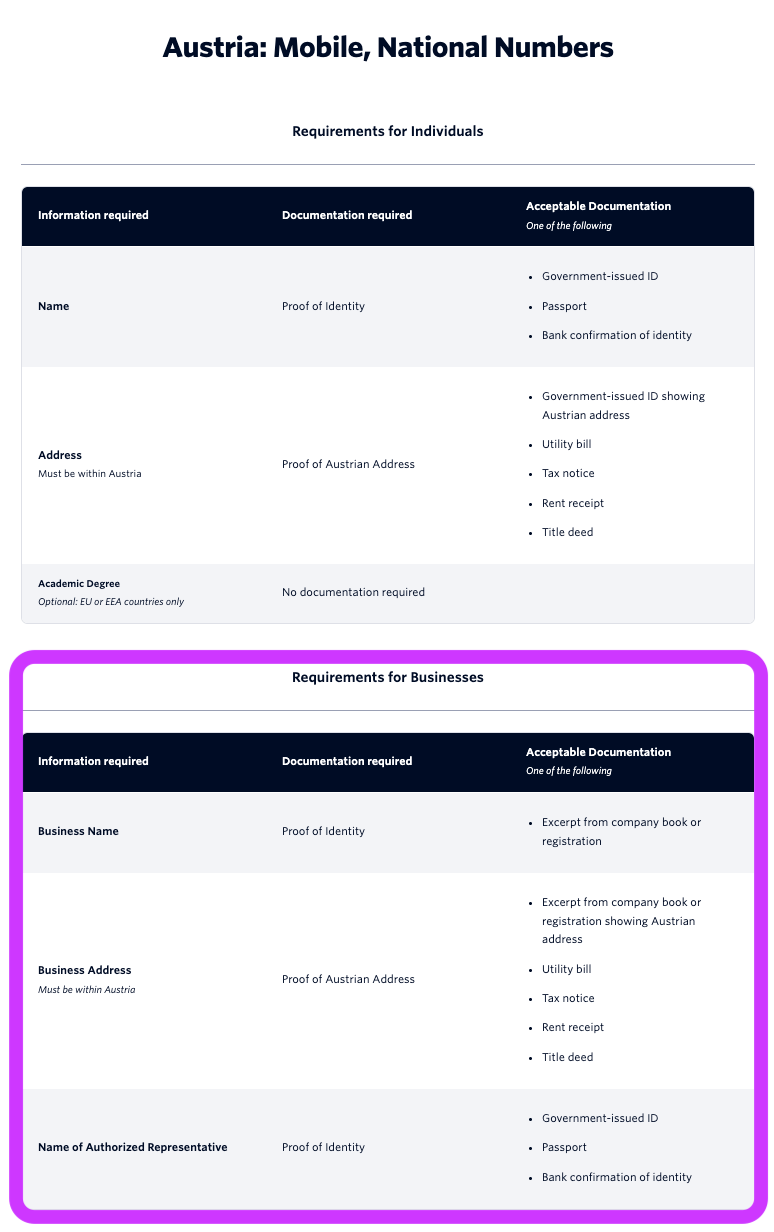
As an example, if you want to submit a Regulatory Bundle for Austria, that would be for National numbers. Open the regulatory requirements for Austria and scroll to the National section. For Austria, there are three pieces of information required for a Regulatory Bundle application.
Business Name – Must be supported by an excerpt from a company book or commercial registrar showing the same business name.
Business address (within the country) – Must be supported by an excerpt from a company book or registrar, a utility bill, a tax notice, a rent receipt, or a title deed showing the same business address.
Name of authorized representative – Must be supported by a government-issued photo ID, a passport, or a bank confirmation of identity showing that representative’s name.
Submitting a Regulatory Bundle
Once you have confirmed your Workspace’s eligibility and compiled the application materials, submitting your Regulatory Bundle takes just a few minutes.
Step 0: Gather the Necessary Information and Supporting Documents
Using the Country Availability and Requirements table above, click the link in the Local Regulatory Requirements column to see Twilio’s up-to-date list of requirements for your target country. You may need to loop in your internal Legal, Compliance, Finance, Accounting, or other teams to collect the necessary supporting documentation.
If you are unsure of the information you need to collect, please contact your Nooks representative or Nooks Support for assistance.
Step 1: Start Your Application in Nooks
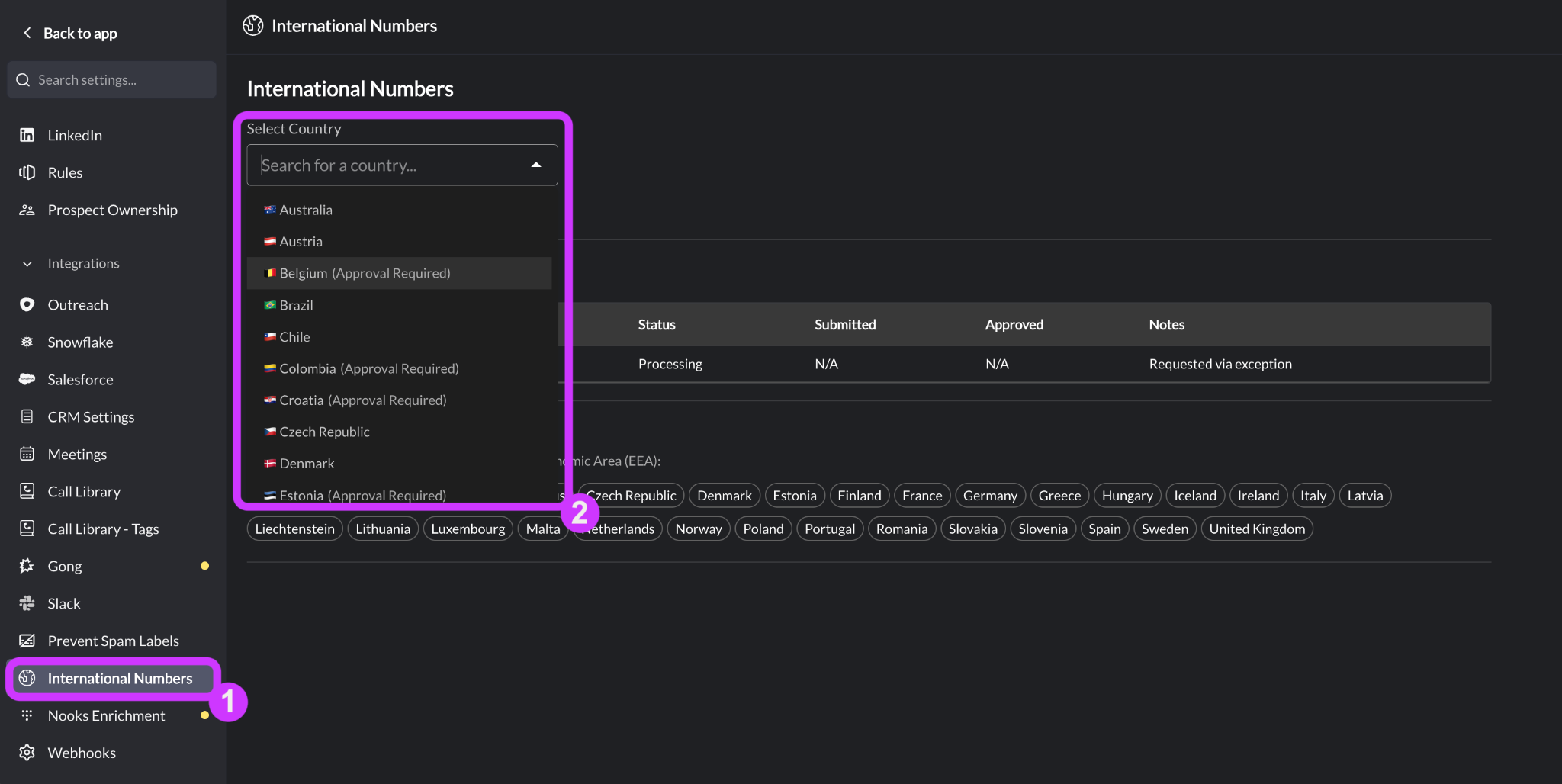
Regulatory Bundles are submitted from the International Numbers page in Nooks Settings. You must be an admin or manager in Nooks to access this page. For Workspaces with Nooks Sequencing, users with the Manage Dialer Settings permission can also access this page.
Go to Settings → All Settings.
Under Integrations, select International Numbers.
Use the Select Country dropdown to select your target country.
Step 2: Complete the Regulatory Bundle Form
For most countries, selecting a country loads Twilio’s compliance application directly in Nooks as an embedded form. No separate Twilio account or login is required. Fill in your business information, upload the required supporting documents, and submit from inside the embedded form.
Pro Tip: Keep the Regulatory Requirements for your target country and any supporting documents open while you complete the Regulatory Bundle submission. Instead of typing responses by hand, copy-paste from your supporting documents where applicable to avoid minor errors that could result in an application rejection.
The length of the form and the amount of information required depends on your target country’s requirements. You will typically encounter some combination of the following pages.
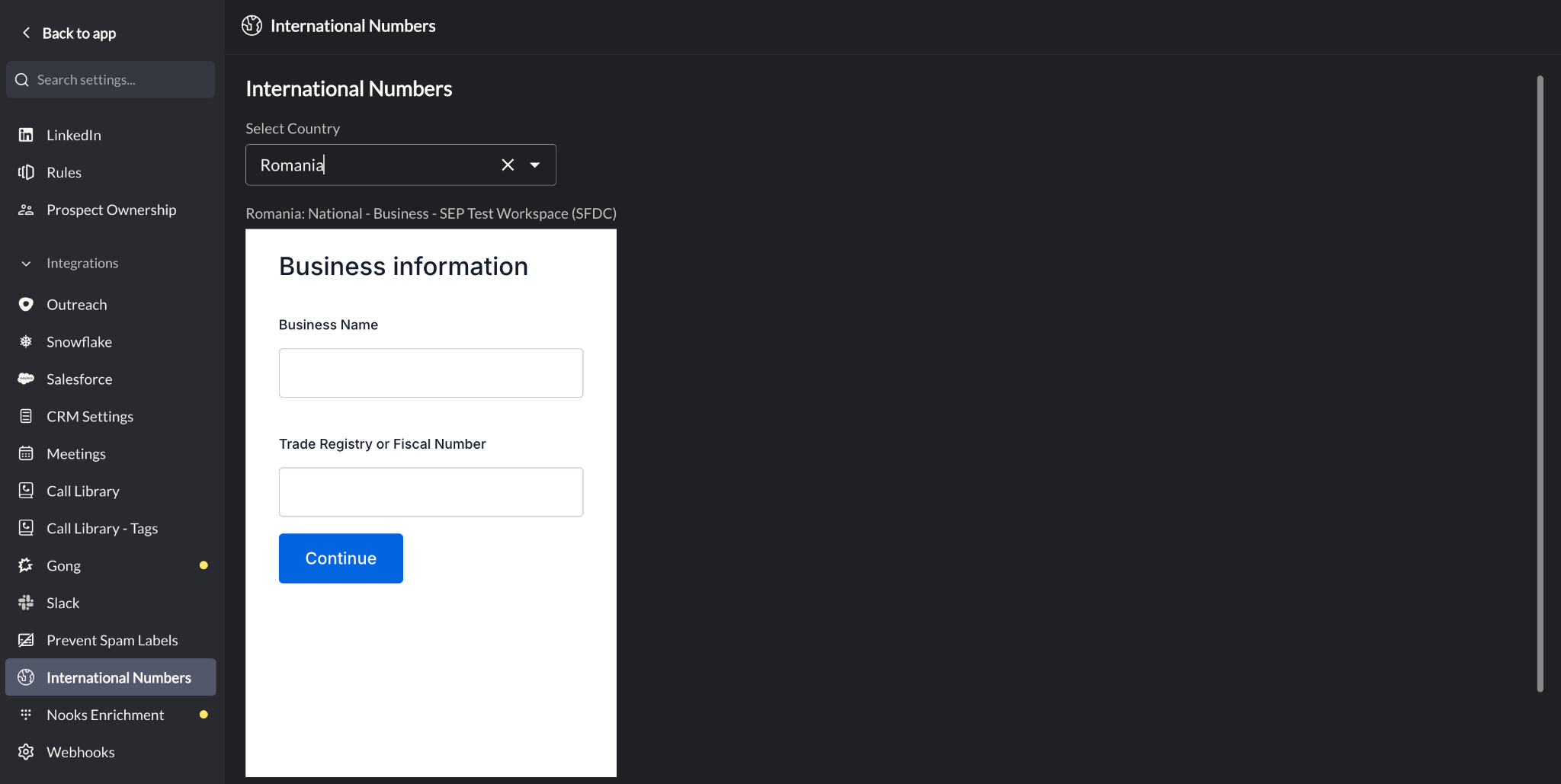
Business Information
Requests identificatory information about your business, such as the business name and registration number. If supporting documentation is required, make sure the information you enter here exactly matches what is listed in your supporting document(s).
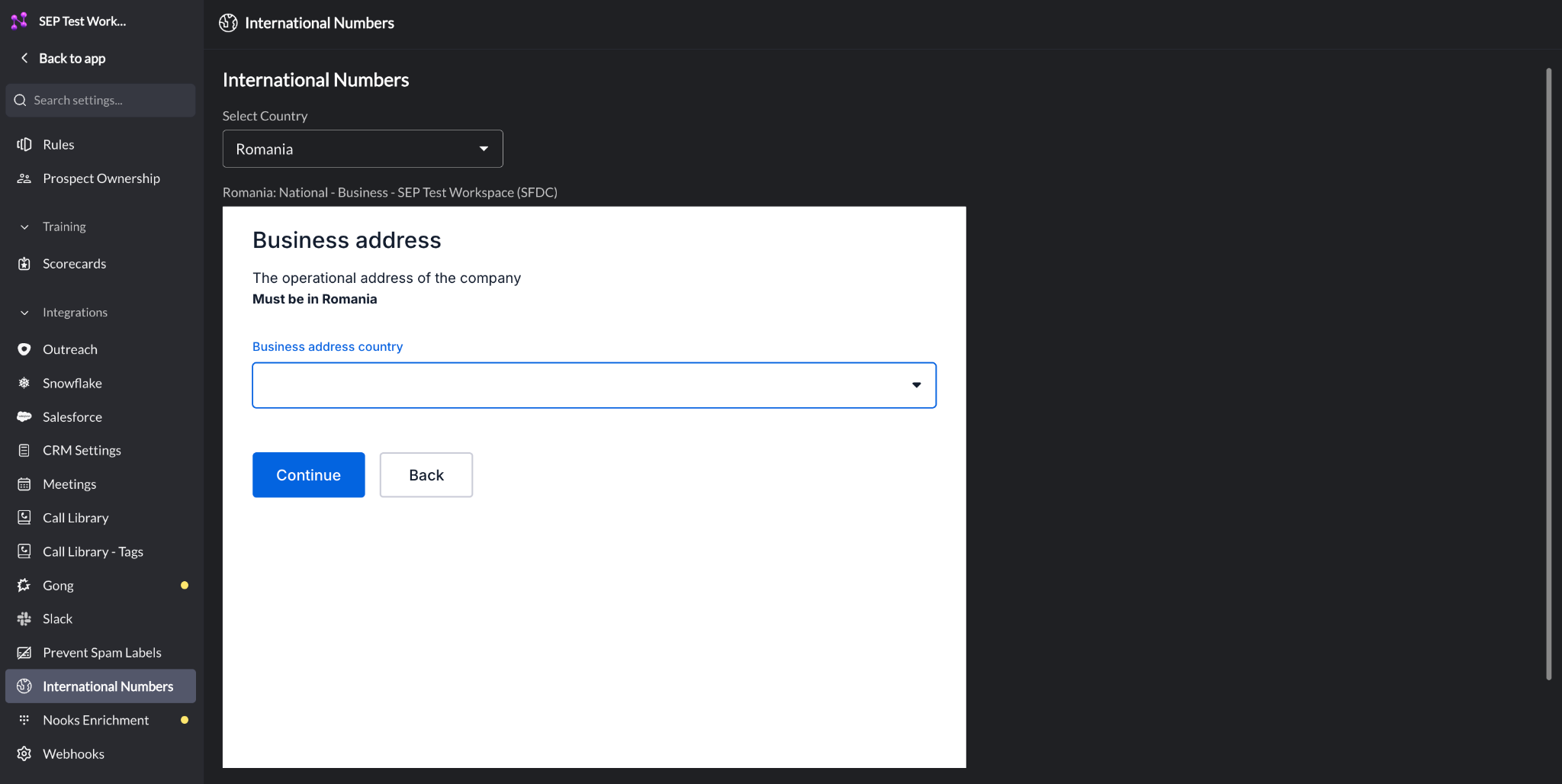
Business Address
Requests your business entity’s address. Check the Twilio requirements for your country, since some require the address to be located within that country. If supporting documentation is required, make sure the information you enter here exactly matches what is listed in your supporting document(s).
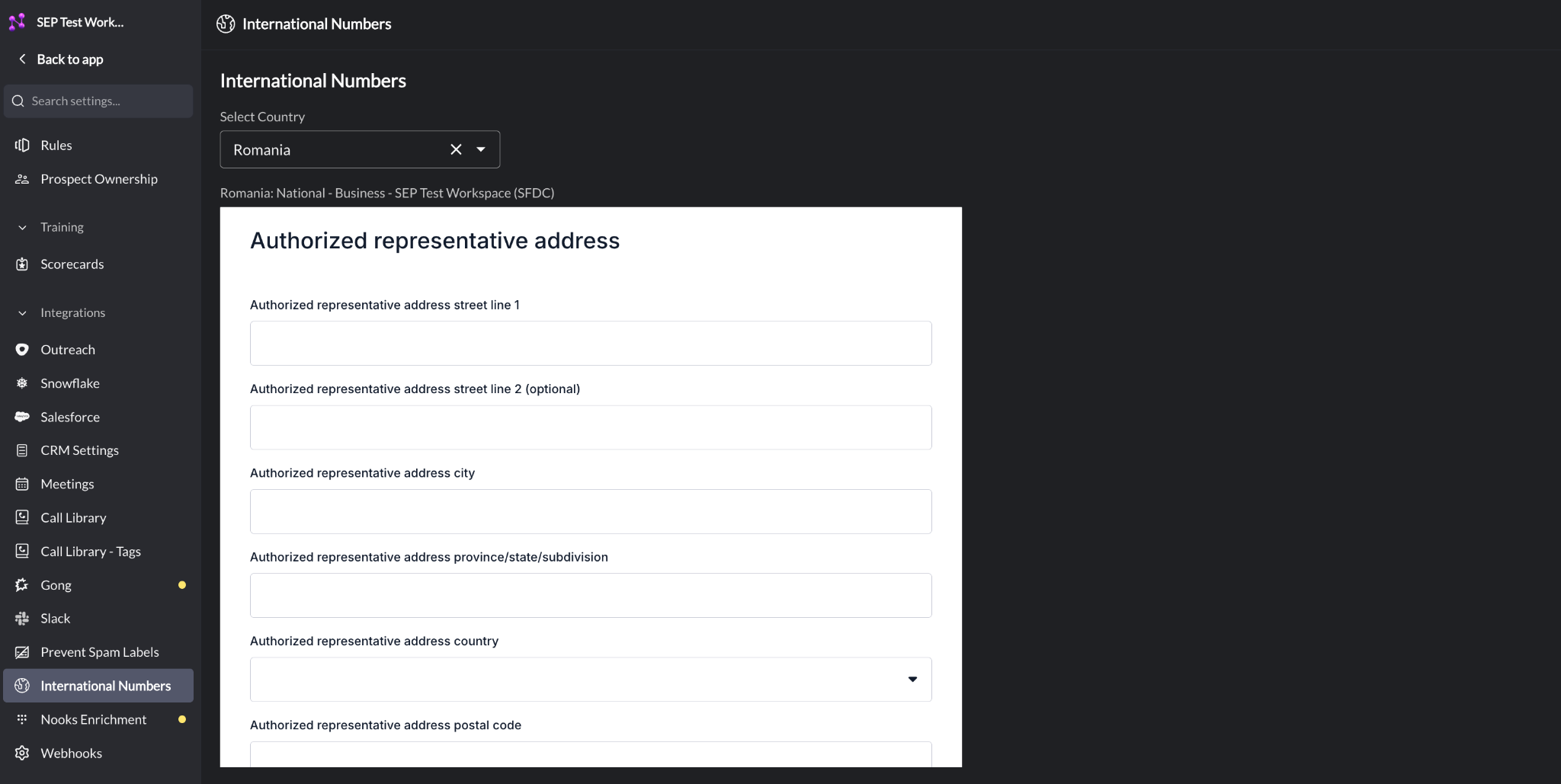
Authorized Representative
Requests the details of an authorized representative (i.e., a designated employee with legal authority to act on your company’s behalf) whose identity must be submitted to comply with local telecom regulations when purchasing phone numbers. Ensure every detail you provide (name, address, date of birth, identity document number, etc.) exactly matches your supporting documents.
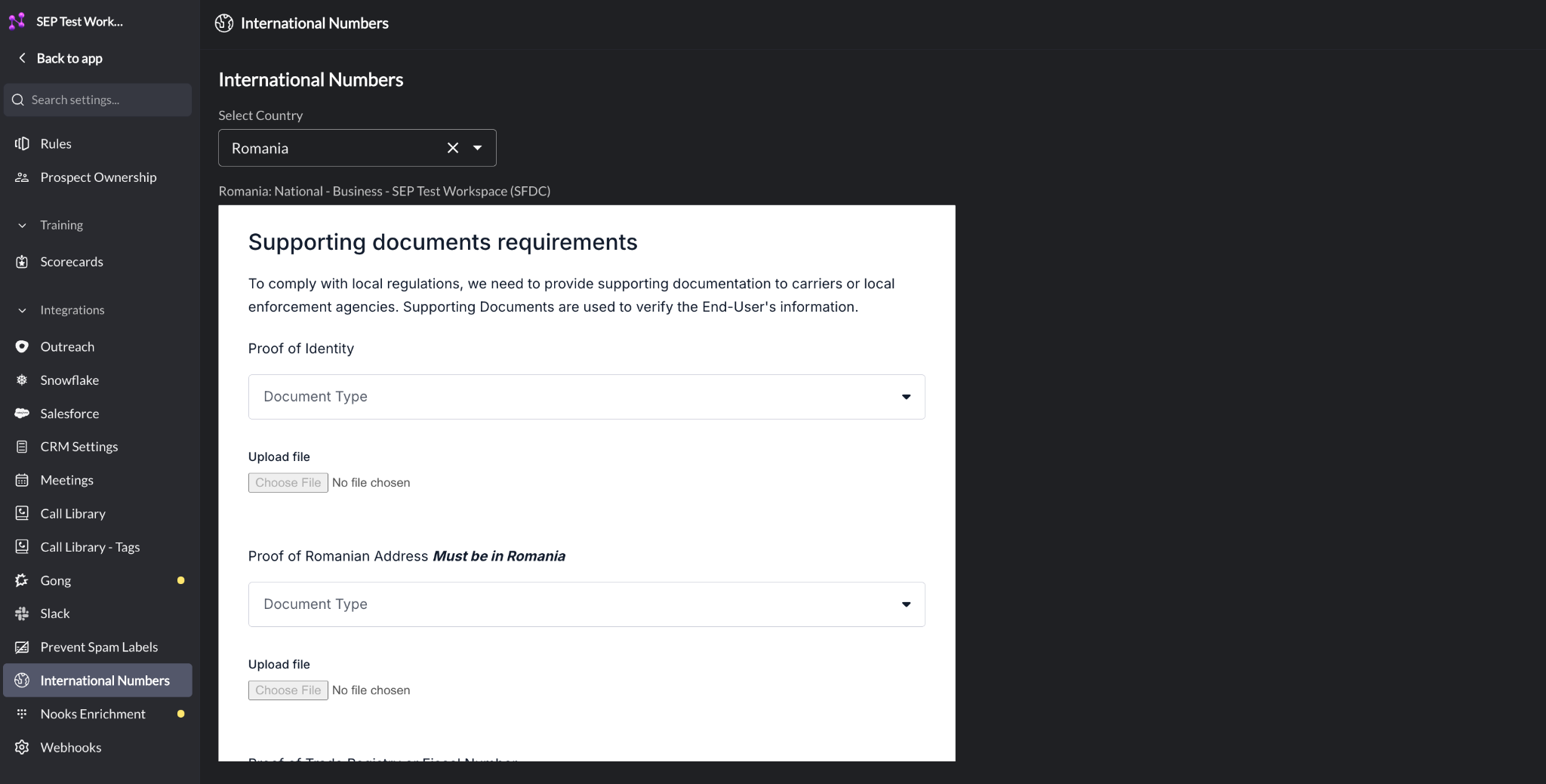
Supporting Documents Requirements
Prompts you to upload the documents that verify the information you entered earlier in the application. For each required document:
Use the Document Type dropdown to select the document type.
Use the Choose file button to upload that document.
If your target country’s requirements allow it, you can reuse the same document to satisfy more than one requirement (for example, using an extract from the Trade Register as proof of both business address and registration number). However, you must still upload the document to each location.
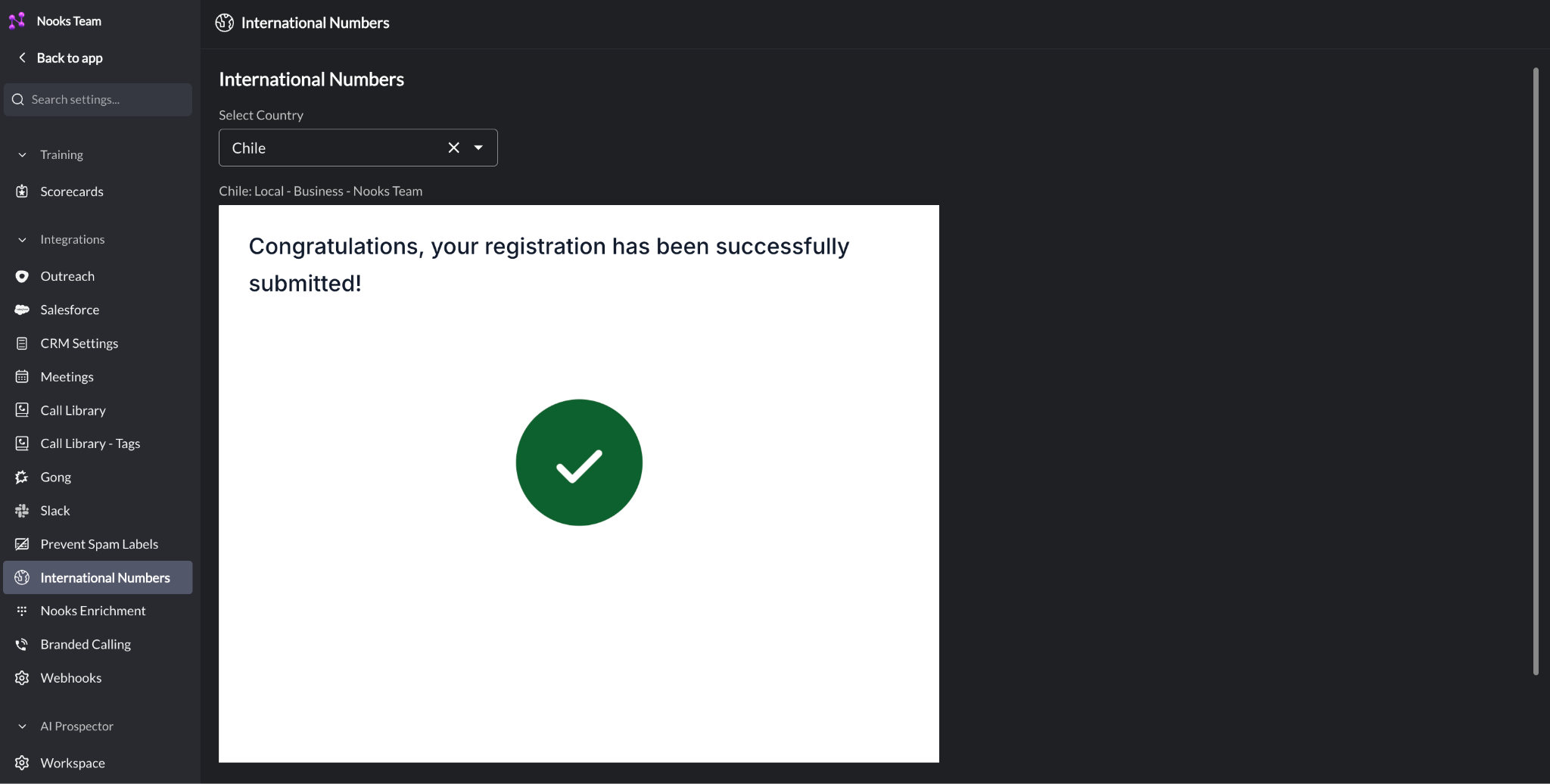
Submission Screen
Once you click Continue on the final page, you will see a success message confirming your application was submitted and is under review with Twilio.
Checking the Status of a Regulatory Bundle
After you submit, Twilio begins reviewing your Regulatory Bundle. Twilio’s typical review window is three business days, though certain countries may take longer.
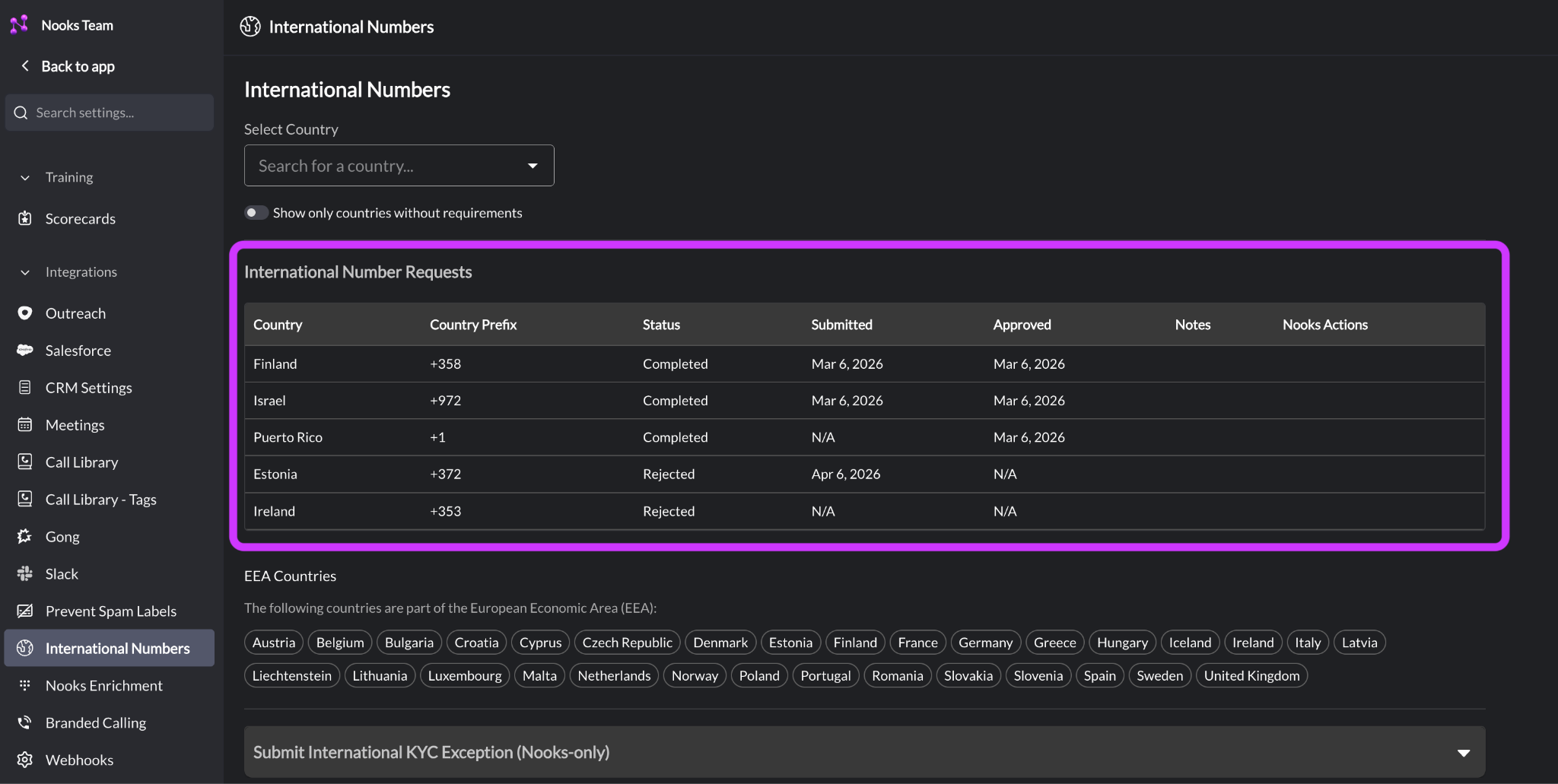
You can monitor your Regulatory Bundle’s status from the International Number Requests table on the same International Numbers settings page. The table lists every Regulatory Bundle your Workspace has submitted, including the country, country code, status, and submission and approval dates.
The statuses you may see include:
Processing – The Nooks team is reviewing and finalizing your application.
Pending Review – Twilio has received your bundle and is reviewing it.
Completed – Your bundle passed review. The country and number type are now unlocked for your Workspace.
Rejected – Twilio found an issue and needs corrected information before it can approve your bundle.
Check back on this table regularly for updates after submitting a Regulatory Bundle. To inquire about the status of a submission, contact your Nooks representative or Nooks Support.
Resubmitting a Bundle
If Twilio rejects your Regulatory Bundle application, you can correct and resubmit it from Nooks.
Go to Settings → All Settings.
Under Integrations, select International Numbers.
Use the Select Country dropdown to select the same country again. Nooks reopens your existing application with your previously entered information.
Correct the necessary information, then resubmit. This starts a new review process, so check the International Number Requests table again for updates.
Common Rejection Reasons
Most rejections come down to a mismatch between your supporting documents and the information you submitted. Common reasons Twilio rejects a bundle include:
A business name or registration number that does not exactly match the supporting document you submitted.
An address that is not within the target country for countries that require a local business entity.
A business address that does not match your supporting document.
An authorized representative who cannot be verified against your business registration.
An insufficient number of supporting documents or supporting documents that do not meet the requirements for the Regulatory Bundle application.
To avoid a rejection, double-check that your legal business name, business registration number, address, and any other information exactly match your supporting documents before you submit.
If you are unsure why an application was rejected, contact your Nooks account team or Nooks Support. Nooks receives more detailed rejection reasons and can provide guidance on how to correct your application.
Helpful Resources
Some countries have online tools where you can look up your business registry entry to find your legal business name, registration number, and required supporting documentation.
Country | Resource |
|---|---|
Australia | |
Ireland | |
United Kingdom | |
United States |
FAQs
How long does Regulatory Bundle approval typically take?
Approval can come back in as little as one day when there's nothing wrong with the submission. Twilio's stated window is up to three business days, and it can run longer for some countries. Because applications are scrutinized closely, we recommend submitting your Regulatory Bundle well in advance of when you need to provision numbers for a country, which gives you time to gather documentation and correct any errors if your first submission is rejected.
Does my company need a registered business entity in a country to get a number from there?
For most countries, yes. A few countries only require an address anywhere in the world, but most require your business to be legally registered in-country. These requirements are set by the local government and telecom authorities within each country, not by Nooks or Twilio. Consult the Country Availability and Requirements table above, or Twilio’s Regulatory Requirements page, to confirm whether a local business entity is required for your target country.
If my Regulatory Bundle is rejected, can I see the exact rejection reason and fix it myself, or do I need to go through Nooks?
You can resubmit your application from the International Numbers settings page in Nooks. If you are not sure why a bundle was rejected, contact your Nooks representative or Nooks Support to get the exact rejection reason.
Why can’t we get a local number in the UAE or other Middle Eastern countries?
Nooks constantly updates our international phone number offerings to make as many countries’ phone numbers available while complying with local regulations. Currently, most Middle Eastern countries heavily restrict local phone numbers for sales use cases, which generally prevents Nooks from provisioning one. Teams have found that calling into this region using a UK number instead works well as a workaround.
Do I have to submit a Regulatory Bundle to call into a country?
No. Regulatory Bundles only govern your ability to provision phone numbers from a country. They have no bearing on your ability to call into that country from a number you already hold.