Introduction to International Phone Numbers
Last updated: October 15, 2026
This guide outlines how Nooks supports dialing from phone numbers outside the United States and Canada. It identifies how international dialing works and the countries where Nooks supports provisioning a dial-from number.
Applies To: Users with an International add-on seat.
Overview
With a Nooks Dialer seat (Power or Parallel), Nooks supports provisioning and dialing from United States and Canada phone numbers. The International add-on seat expands your global coverage by enabling you to provision numbers from 35+ countries and territories and dial into 200+ countries. This means global teams can use the same Nooks Dialer they already know to reach more prospects while maintaining call quality and compliance.
Supported Countries and Territories
Nooks partners with our third-party VoIP provider, Twilio, to make phone numbers available from countries and territories across the globe. We constantly update the list of countries we support to provide access to as many countries as possible while complying with local governmental regulations around phone numbers used for sales use cases.
As of September 2026, Nooks supports international phone number provisioning from the countries in the following table. Most countries require you to submit a Regulatory Bundle to comply with local governmental and telecom regulations before you are able to provision phone numbers. Some countries’ phone numbers are also only available via Private Offering, which requires them to be provisioned directly from a local telecom provider rather than on-demand from the Nooks Dialer.
Country | Requires Regulatory Bundle | Business Address Requirements | Private Offering Number |
|---|---|---|---|
Australia | ✅ Yes | Anywhere in the world | ❌ No |
Austria | ✅ Yes | Within the country | ❌ No |
Belgium | ✅ Yes | Within the country | ✅ Yes |
Brazil | ✅ Yes | Within the country | ✅ Yes |
Chile | ✅ Yes | Within the country | ❌ No |
Colombia | ✅ Yes | Within the locality or region covered by the phone number’s prefix | ❌ No |
Croatia | ✅ Yes | Within the locality or region covered by the phone number’s prefix | ❌ No |
Czechia (Czech Republic) | ❌ No | No submission needed | ❌ No |
Denmark | ✅ Yes (address only) | Within the country | ❌ No |
Estonia | ✅ Yes | Anywhere in the world | ❌ No |
Finland | ✅ Yes (address only) | Within the country | ❌ No |
France | ✅ Yes | Within the country | ✅ Yes |
Germany | ✅ Yes | Within the country | ❌ No |
Hong Kong | ✅ Yes | Anywhere in the world | ✅ Yes |
Hungary | ✅ Yes | Within the locality or region covered by the phone number’s prefix | ✅ Yes |
Iceland | ✅ Yes | Within the country | ✅ Yes |
Ireland | ✅ Yes | Must include Eircode and be within locality or region covered by the phone number's prefix | ❌ No |
Israel | ❌ No | No submission needed | ❌ No |
Italy | ✅ Yes | Within the locality or region covered by the phone number’s prefix | ✅ Yes |
Luxembourg | ✅ Yes | Within the country | ✅ Yes |
Malaysia | ✅ Yes | Within the locality or region covered by the phone number’s prefix | ❌ No |
Mexico | ✅ Yes | Within the locality or region covered by the phone number’s prefix | ❌ No |
Netherlands | ✅ Yes | Within the locality or region covered by the phone number’s prefix | ✅ Yes |
New Zealand | ✅ Yes | Anywhere in the world | ❌ No |
Norway | ✅ Yes | Within the country | ✅ Yes |
Poland | ✅ Yes | Within the locality or region covered by the phone number’s prefix | ❌ No |
Portugal | ✅ Yes | Within the country | ✅ Yes |
Puerto Rico | ❌ No | No submission needed | ❌ No |
Romania | ✅ Yes | Within the country | ❌ No |
Singapore | ✅ Yes | Anywhere in the world | ✅ Yes |
South Africa | ✅ Yes | Within the country | ❌ No |
Spain | ✅ Yes | Within the locality or region covered by the phone number’s prefix | ✅ Yes |
Sweden | ✅ Yes | No submission needed | ❌ No |
Switzerland | ✅ Yes | Within the country | ❌ No |
United Kingdom | ✅ Yes | Anywhere in the world | ❌ No |
If you do not see a country in the list, share your dialing use case with your Nooks representative for best practices and possible alternatives.
How to Enable Phone Number Creation for a Country
The steps below provide an overview of how to enable phone number provisioning for a country depending on its regulatory requirements.
To complete these steps, you must be a Nooks admin or manager. Users with a Nooks Sequencing seat and the Manage Dialer Settings permission enabled on their Nooks Permission Profile can also complete these steps.
Countries without Regulatory Bundle Requirements
To enable reps to provision a phone number in a country that has no Regulatory Bundle requirements:
Go to Settings → All Settings.
Under Integrations, select International Numbers.
In the Select Country dropdown, choose the target country.
Click Enable phone creation.
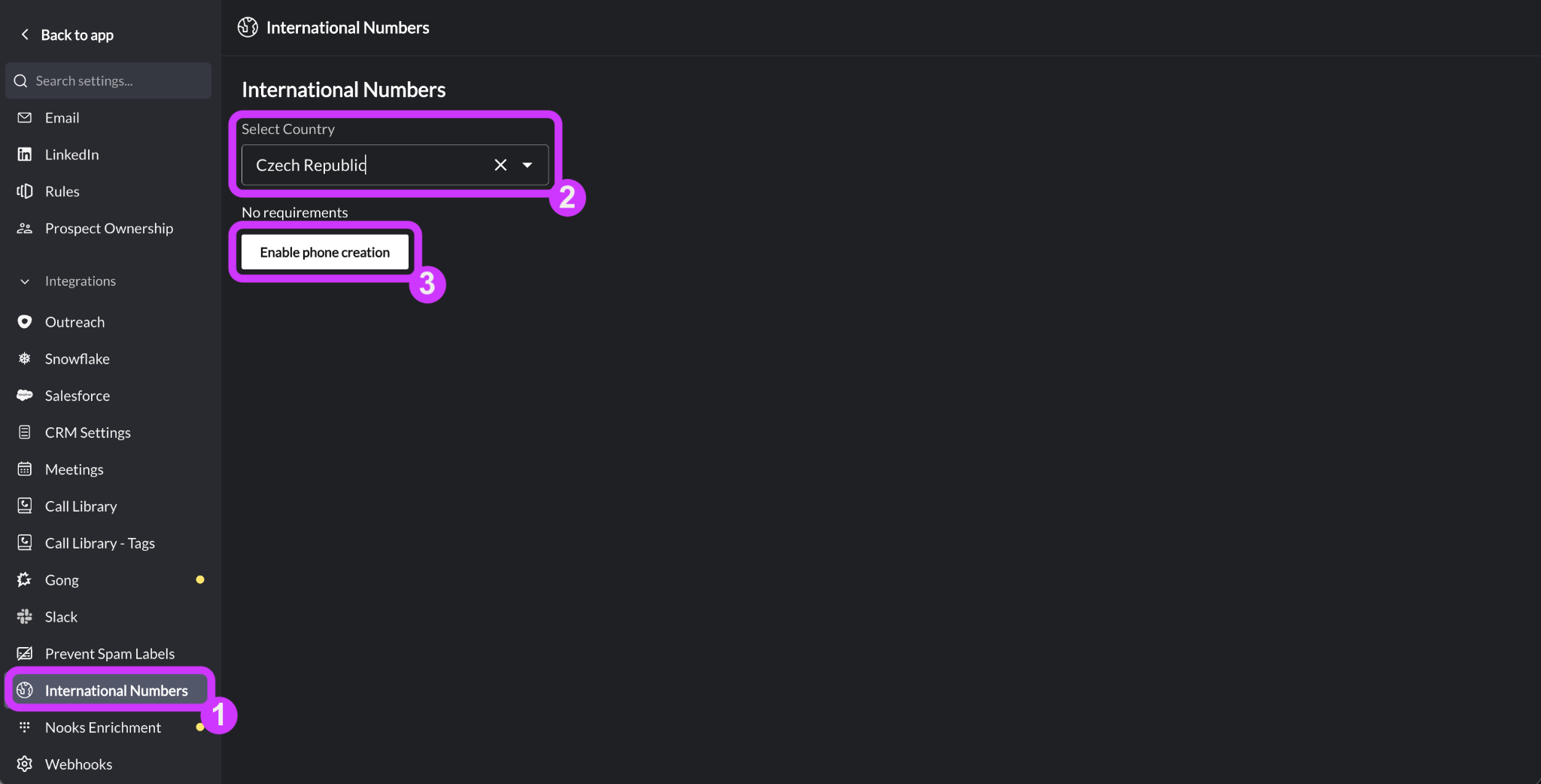
Afterwards, users with an International seat will see that country in the Country dropdown in the Create a number modal.
Regulatory Bundles
A Regulatory Bundle is an application package of information and supporting documents that many local governments and telecom agencies require before they will let you provision phone numbers from their country. Select countries only require an address submission.
Workspace admins and managers can submit a Regulatory Bundle directly within Nooks. Only one Regulatory Bundle needs to be submitted per country. The exact regulatory requirements your company must meet to complete an application vary by country, with most countries requiring a local in-country business entity. Most error-free submissions are approved within three business days, though some can be approved sooner.
Learn more about the regulatory requirements for each country and how to submit a bundle in this guide.
Private Offering
A handful of countries require one additional step after Regulatory Bundle submission. Due to local regulations, phone numbers are not generally available for on-demand provisioning in these countries. Instead, they must be purchased directly from a local telecom provider.
To provision Private Offering phone numbers after submitting a Regulatory Bundle, contact your Nooks representative or Nooks Support. Nooks will work with Twilio to procure your Workspace a supply of phone numbers. Turnaround windows differ by country, but most countries deliver within 1–2 weeks.
Learn more about Private Offering phone numbers in this guide.
International Number Credits and Included Minutes
Every user with an International seat receives 15 International Number Credits per month. These credits can be used to provision new phone numbers from outside the United States and Canada. The International Number Credit cost differs by country and reflects the actual cost of purchasing a phone number from that country. Provisioning phone numbers from the United States or Canada doesn't consume International Number Credits.
An International seat includes 2,000 minutes per user per month for calls to destination numbers outside the United States or Canada. Only connected call time (carrier-billed voice time) counts towards your minutes. Minutes start counting whenever a call is answered, including when a voicemail or answering machine answers, and are rounded up to the nearest minute. Ringing time and calls cancelled during ringing (i.e., before the call connects) do not count toward your minutes.
International Smart Presence
Nooks supports International Smart Presence for users with an International seat. International Smart Presence uses the same Smart Presence toggle in the Dialer as standard (US and Canada) Smart Presence.
Unlike U.S./Canada Smart Presence, which matches your call-from number to the region of the destination number, International Smart Presence matches your call-from number to the country code of the destination number. If your team doesn't have a call-from number with a matching country code—either because Nooks doesn't support provisioning numbers from that country, or your Workspace doesn't have an approved Regulatory Bundle for it—Nooks falls back to using a number from the country with the highest connect rates to your destination.
Learn more about International Smart Presence in this guide.
Best Practices
Follow the recommendations to get the most from your international phone numbers.
Submit Regulatory Bundles in advance. Submit Regulatory Bundles several weeks before you expect to need the associated numbers, especially for countries where numbers are only available through Private Offering. This gives your team time to gather the required information and address any issues identified during the review process. Use International Smart Presence. When dialing internationally, International Smart Presence selects numbers from countries with the highest historical connect rates for the destination, making phone number management easy. It also automatically scales your number pool based on call volume and regularly rotates numbers to reduce the likelihood of spam labeling.
FAQs
Does our Workspace need to submit a new Regulatory Bundle application every time a user wants to provision a number from a country?
No. Only one Regulatory Bundle needs to be submitted per country per Workspace. Once it’s approved, you can provision as many phone numbers as you need from that country (subject to Private Offering requirements, where applicable).
What if we need phone numbers from a country that Nooks does not currently support?
Nooks strives to make phone numbers available in as many countries as possible while adhering to local regulatory requirements. If you do not see a country in the list of supported countries, reach out to your Nooks account team to discuss possible alternatives.