International Smart Presence
Last updated: October 15, 2026
This guide explains International Smart Presence, the feature that automatically picks a country-matched call-from phone number for your calls to prospects outside the United States and Canada. It covers what the feature does, how to turn it on, how the number-matching logic works, and how to troubleshoot common issues.
Applies To: Users with an International add-on seat.
Overview
Smart Presence is a Dialer setting that lets Nooks choose your outbound call-from phone number for you the moment you dial, instead of always calling from the number you last selected. With Smart Presence, Nooks picks the number in your Workspace’s pool that is most likely to get the prospect to pick up, based on real connect-rate data.
International Smart Presence extends that same matching logic to calling destinations outside the United States and Canada, covering every country your team is approved to call into. For example, a rep calling a prospect in Germany can automatically be matched to a German number instead of dialing from a U.S. number.
Some of the key benefits of International Smart Presence include:
Easier phone number management: Reps do not need to manually switch their call-from phone number every time they dial a prospect in a different country.
Increased connect rates: Aggregate data from July 2026 shows that calls that get a matched number from International Smart Presence connect at a higher rate than calls made without it.
Integration into existing workflows: International Smart Presence uses the same Smart Presence toggle in the Dialer as U.S./Canada Smart Presence, so reps don't need to turn on any extra settings to use it.
Video Walkthrough
Before You Begin
Before International Smart Presence can pick a matched number for a call, a few requirements need to be met for your Workspace and for your seat.
Your Workspace needs an approved Regulatory Bundle in the destination country. Nooks can only pick a call-from phone number from a country if your Workspace has completed the regulatory approval process for that country. A country appearing in the supported list doesn't remove this requirement. See this guide to learn how to submit a Regulatory Bundle for the countries you want to call from.
For Private Offering countries, your Workspace needs phone numbers provisioned to your Workspace pool. Some countries, known as Private Offering countries, only allow phone numbers to be provisioned directly from local telecom providers. For Nooks to pick a number from these countries, you must have unassigned Private Offering numbers in your Workspace pool.
You need an International seat. International Smart Presence is limited to users who hold an International seat in Nooks.
You must select a number in the Dialer before you can turn Smart Presence on. The Smart Presence toggle stays disabled until you have chosen a number.
Turning on International Smart Presence
To enable Smart Presence for your next call or call session:
Load a Sequence or call list into the Dialer. Alternatively, launch a call task.
Click into the From number box:
Select a call-from number (if one is not already selected).
Turn on the Smart Presence toggle.
Initiate your call or call session.
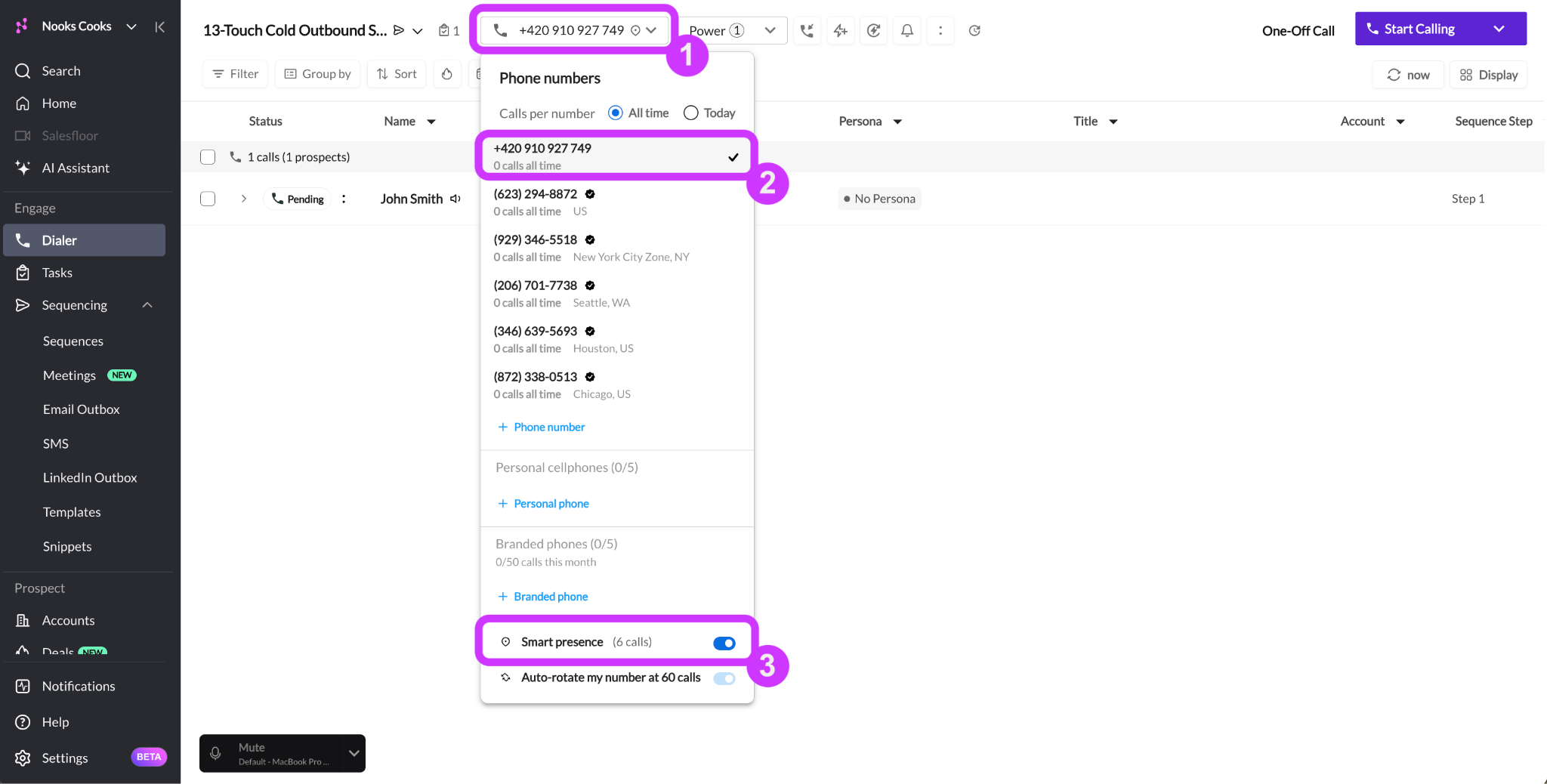
When you call with the Smart Presence toggle enabled, Nooks automatically places each call from the best call-from number available for the recipient phone number.
How International Smart Presence Works
Understanding the logic behind each pick helps explain why your call-from phone number sometimes changes between calls, and why a call may not use a local number even when Smart Presence is enabled.
Matching Logic
When you dial a non-U.S./Canada with Smart Presence on, Nooks automatically chooses a call-from phone number in this order:
Country match first. If your Workspace has an approved number pool in the prospect’s country, Nooks dials from that country.
Smart fallback when there is no match. If your Workspace has no number in the prospect’s country, Nooks falls back to the approved country in the pool with the best historical connect rate to that destination. Countries in the same region are prioritized when possible. For calls to India, for example, Nooks might use an Australian number if your Workspace holds one, then one from the U.K., then one from the U.S.
International Smart Presence matching happens at the country level. Numbers are grouped by their country calling code rather than their prefixes.
Before falling back to another country, Nooks checks whether you have already connected with the prospect using a specific number, and reuses that number if possible. Nooks also avoids reusing a number that has been used to call the prospect twice without connecting.
Pool Scaling and Number Rotation
Each Workspace has its own dedicated pool of International Smart Presence numbers. Your Workspace’s pool is never shared with another company. The table below summarizes how that pool grows and refreshes over time.
Behavior | What Happens |
Starting size | One number per approved country, which comfortably covers about five reps dialing that country. |
Scaling up | Nooks adds numbers automatically once your team’s call volume in a country picks up to prevent the same number from being over-used. |
Rotation | Numbers are renewed and rotated out of the pool every 30 days. This lowers the chance a number gets flagged as spam, since pooled numbers are used by more reps than a number assigned to just one rep. |
Supported Countries
International Smart Presence currently supports country matching when dialing into the following countries. The exact countries your Workspace can call from depends on which countries your Workspace is approved to call from. Note that Private Offering countries have additional provisioning requirements.
Region | Supported Countries | Private Offering Countries |
LATAM | Chile, Colombia, Mexico, Puerto Rico | Brazil |
Nordics | Denmark, Finland, Sweden | Norway |
Europe | Austria, Croatia, Czechia, Estonia, Germany, Ireland, Poland, Romania, Switzerland, United Kingdom | Belgium, France, Hungary, Iceland, Italy, Luxembourg, Netherlands, Portugal, Spain |
Middle East and Africa | Israel, South Africa | — |
APAC | Australia, Malaysia, New Zealand | Hong Kong, Singapore |
Note on Private Offering Countries: Numbers from Private Offering countries go through an additional provisioning process, since they must be requested directly from local telecom providers rather than generated on demand. For number matching to Private Offering countries to work, you must have unassigned Private Offering numbers in your Workspace number pool. Once a Private Offering number is used by Smart Presence, it's reserved for Smart Presence only until it's rotated out, which keeps reps from claiming it for individual use.
Callbacks to an International Smart Presence Number
Callbacks to an International Smart Presence number work the same way as callbacks to a U.S./Canada Smart Presence number. Smart Presence remembers which team member last used the number to call the prospect and routes callbacks from that prospect to the correct team member’s Dialer.
Troubleshooting
Use the list below to resolve common snags you may encounter when using International Smart Presence.
Call Went Out from a Number in the Wrong Country
If your call goes out from a number in a country that doesn't match your prospect's country, it's almost always for one of the following reasons. Work through these checks in order:
Nooks does not support calling from phone numbers in that country. Check the list of supported countries to verify that Nooks supports calling from that country. If a country is not on the list, Nooks routes your call from a phone number whose country has the best historical connect rate for calls with your destination country.
Your Workspace does not have an approved Regulatory Bundle for that country yet. Even if a country is on the supported list, International Smart Presence only works for countries for which your team has completed the regulatory approval process. Work with your Workspace admin to verify that your team has a Regulatory Bundle submitted for that country (or enabled phone creation for countries that do not require a Regulatory Bundle).
The country is a Private Offering country and your team has no numbers remaining in your Workspace’s pool. Private Offering countries require phone numbers to be provisioned directly from a local telecom provider rather than on demand. For International Smart Presence to use a number from a Private Offering country, in addition to having an approved Regulatory Bundle, you must have unassigned numbers in your Smart Presence pool. Contact your Nooks representative or Nooks Support to check the status of your pool and provision additional numbers for you.
A Number I Am Calling from Was Flagged as Spam
Nooks automatically scales your International Smart Presence pool and rotates numbers out every 30 days to reduce the likelihood that an International Smart Presence number acquires a spam label.
Occasionally, a number may receive a spam label before it is rotated out. In such cases, please share the number with Nooks Support so it can be reviewed and removed from your Workspace’s pool as needed.
FAQs
Am I sharing numbers with other companies?
No. Each Workspace has its own dedicated pool of Smart Presence numbers. Your numbers are never shared with another Workspace.
Can I use International Smart Presence to call a country for which our Workspace does not have a Regulatory Bundle approved?
You can use International Smart Presence to place calls into any country. For country-level matching, your Workspace typically needs an approved Regulatory Bundle for the country before the country will issue you phone numbers.
If you don't have an approved Regulatory Bundle for the destination country, or Nooks doesn't support call-from numbers there, International Smart Presence selects a call-from number from the country with the best historical connect rate to your destination
Learn more about which countries require a Regulatory Bundle and how to submit one in this guide.
Does International Smart Presence match down to a city or region, or just the country?
Just the country. International matching groups numbers by country calling code.
Is there a workspace-wide way to turn International Smart Presence off for everyone at once?
Not today. Each rep controls their own Smart Presence toggle. If you are a Workspace admin and want to discuss options for a specific use case, reach out to your Nooks representative.